

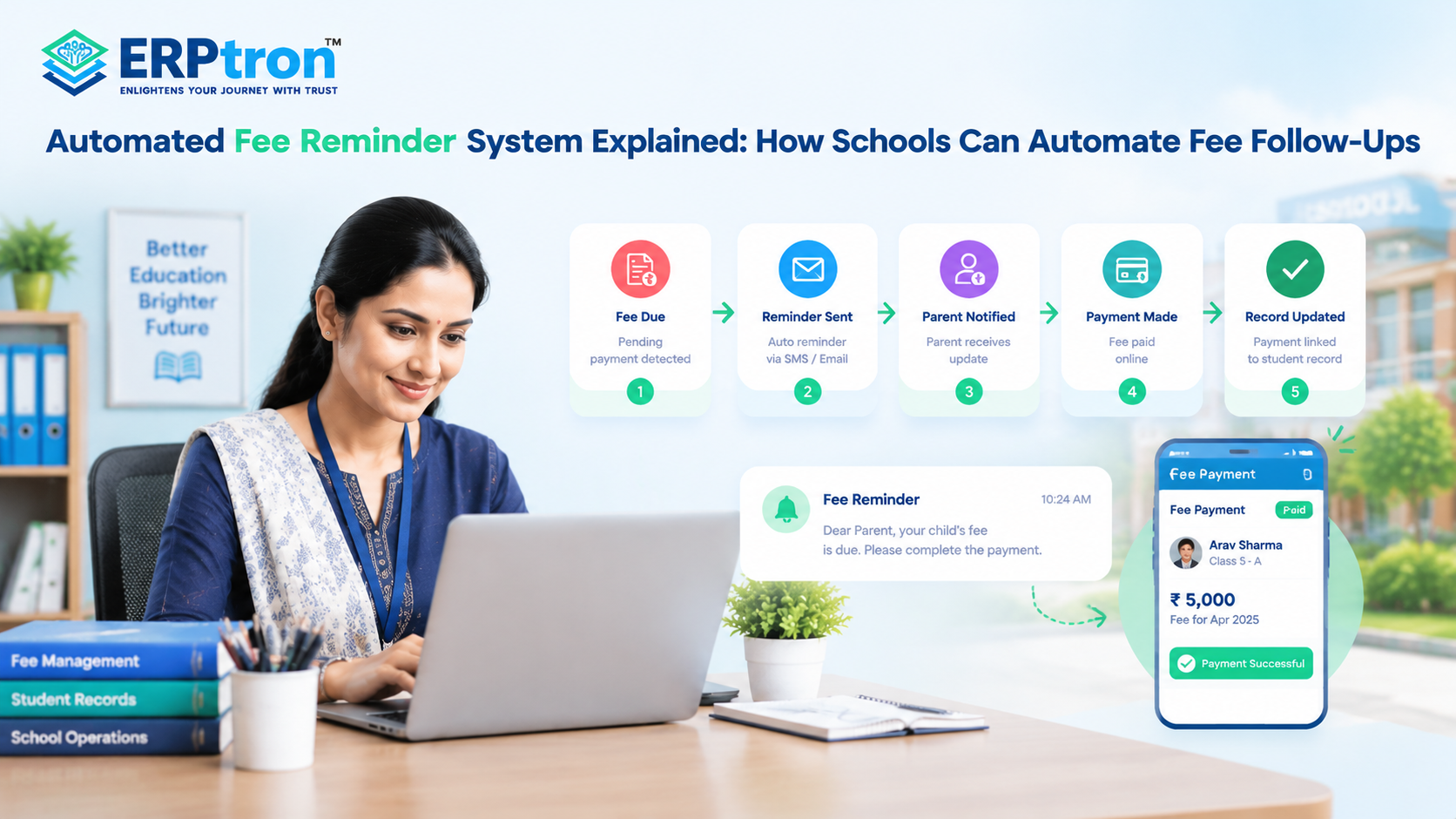
Fee collection does not end when the school creates a fee structure. Schools also need to track pending payments, remind parents, follow up on overdue fees, and update records.
When these tasks are handled manually, accounts teams can spend a lot of time checking records and sending repeated reminders, especially when the number of students is high.
An Automated Fee Reminder System can make this process easier. Schools can set rules based on fee due dates and payment status so that reminders are sent automatically.
The process can become simpler: Fee Due → Reminder Sent → Parent Notified → Payment Made → Record Updated.
In this guide, we’ll explore how automated fee reminders work, how they can reduce administrative work, and how schools can make fee follow-ups more organized.
What Is an Automated Fee Reminder System?
An Automated Fee Reminder System helps schools send fee reminders to parents automatically. Instead of staff checking payments and sending messages manually, the system sends reminders based on the fee due date and payment status.
For example, it can send a reminder before the due date and another one if the fee becomes overdue. Once the parent pays, the system can update the payment status and stop further reminders.
Reminders can be sent through SMS, email, WhatsApp, notifications, or a parent app, depending on the system.
In simple terms, it helps schools save time, reduce manual work, and keep parents informed about pending fees. Schools can also explore a fee management system for schools to understand how digital fee collection and payment tracking work together.
How Does an Automated Fee Reminder System Work?
An automated fee reminder system follows a simple process. It checks the fee details and payment status, then sends reminders based on the rules set by the school.
Step 1: Fee Details Are Added
The school adds basic details such as the fee type, amount, due date, installment, and applicable students or classes.
Step 2: Payment Status Is Checked
The system checks whether the fee is paid, partially paid, due, or overdue.
Step 3: Reminder Is Scheduled
The school can decide when reminders should be sent. For example, a reminder can be sent 7 days before the due date, 1 day before, and again after the due date if payment is still pending.
Step 4: Parent Receives the Reminder
The parent receives the reminder through SMS, email, WhatsApp, notification, or a parent app, depending on the system. Schools can learn more about available communication approaches in The Complete Guide to Parent Communication Software for Schools.
Step 5: Payment Is Updated
When the parent makes the payment, the system can update the fee status if payment integration is available.
Step 6: Reminders Stop
Once the payment is recorded, further reminders for that fee should stop.
In simple terms: Fee Added → Reminder Sent → Payment Made → Status Updated → Reminders Stop.
Automated Fee Reminders vs. Manual Fee Follow-Ups
The difference becomes clearer when the two processes are compared.
| Area | Manual Follow-Up | Automated Reminder |
| Identifying pending fees | Manual | System-based |
| Reminder scheduling | Manual | Predefined rules |
| Sending messages | Manual | Automated |
| Follow-up consistency | Depends on staff | More consistent |
| Tracking | Spreadsheet/register | Digital records |
| Scalability | Limited | Higher |
| Staff workload | Higher | Lower for routine tasks |
| Payment status | Manually checked | Can be system-connected |
Schools considering a shift from manual processes can also read School ERP Software: The Complete Guide to Automating School Administration to understand how digital systems can simplify routine administrative work.
Why Do Schools Need Automated Fee Reminders?
Schools collect fees throughout the year. As the number of students increases, checking payments and reminding parents about due fees can take a lot of time. An Automated Fee Reminder System helps schools send timely reminders, track payments, and reduce manual work.
1. Saves Time for School Staff
School staff do not need to check every student’s fee records and send reminders manually. The system can identify pending payments and send reminders automatically.
2. Sends Timely Fee Reminders
The system can send reminders before the due date and follow-up messages when fees become overdue. This helps parents remember payment deadlines.
3. Supports Different Types of Reminders
Schools can send reminders for upcoming fees, overdue payments, installments, and partial payments. This helps manage different fee schedules more easily.
4. Sends Personalized Messages
Fee reminders can include the student’s name, pending amount, due date, and payment instructions. This helps parents understand exactly what they need to pay.
For example: “Your child’s school fee of ₹X is due on [date]. Please complete the payment through the school payment portal.”
5. Makes Online Payments Easier
When reminders include online payment instructions or a payment link, parents can pay fees conveniently without visiting the school office.
Reminder → Online Payment → Confirmation → Digital Receipt.
Schools can learn more about the benefits and implementation of digital fee collection for schools.
6. Updates Payment Records Automatically
After a successful payment, the system can update the fee status and generate a digital receipt, depending on its features. This reduces manual record-keeping.
7. Prevents Unnecessary Reminders
When payment records are updated correctly, the system can stop sending reminders for fees that have already been paid. This helps avoid confusion and unnecessary messages to parents.
8. Reduces Manual Follow-Ups
Without automation, staff may need to prepare lists of students with pending fees and contact parents individually. Automated reminders reduce this repetitive work.
9. Helps Track Pending Fees
School administrators can check which payments are pending, overdue, or partially paid. This makes it easier to monitor fee collection and identify cases that need personal follow-up.
10. Improves Communication with Parents
Clear and timely reminders help parents understand payment deadlines and outstanding amounts. This reduces confusion and unnecessary calls to the school office.
Schools can further improve communication by connecting reminders with a school mobile app, where parents can access fee information and other school updates.
Common Mistakes in Automated Fee Reminders
Automated fee reminders help schools save time and manage payments easily. However, if reminders are not set up properly, they can confuse parents and create extra work for school staff. Here are some common mistakes schools should avoid.
1. Sending Too Many Reminders
Sending the same reminder repeatedly can annoy parents. Schools should follow a clear schedule and send reminders based on the due date and payment status.
2. Sending Unclear Messages
Fee reminders should clearly mention the pending amount, payment deadline, and payment instructions. Simple messages help parents understand what they need to do.
3. Not Updating Payment Status
When parents pay their fees, the system should update the payment status quickly. This helps prevent unnecessary reminders after payment.
4. Not Providing an Easy Payment Option
Parents should be able to pay fees easily. If online payments are available, reminders can include a payment link or clear instructions to complete the payment.
5. Not Providing Human Support
Some payment problems require personal assistance. Schools should provide a way for parents to contact the accounts team if they face failed payments, incorrect amounts, or other issues.
6. Sending Reminders at the Wrong Time
Sending reminders too early, too late, or at inconvenient hours can irritate parents. Schools should choose suitable times and follow a planned reminder schedule.
7. Not Tracking Reminder Results
Schools should check whether reminders help improve fee collection. Tracking pending fees, completed payments, and overdue amounts helps schools improve their reminder process.
What Should a School Look for in a Fee Reminder System?
Schools should look beyond basic SMS or notification features. A good fee reminder system should work as part of the school’s wider fee management process.
1. Custom Reminder Rules
The school should be able to decide when reminders are sent, such as before the due date, on the due date, and after the payment becomes overdue.
2. Different Fee Types
The system should be able to manage different fees, such as tuition fees, transport fees, examination fees, or other school charges.
3. Clear and Personal Messages
Messages should include useful information such as the student’s name, fee amount, due date, and payment details where appropriate.
4. Multiple Communication Channels
Depending on the school’s needs, reminders may be sent through SMS, email, notifications, WhatsApp, or other supported channels.
5. Easy Payment
Parents should have a simple way to make payments after receiving a reminder, where online payment is available.
6. Automatic Payment Updates
After a successful payment, the fee status should be updated so that further reminders are stopped.
7. Digital Receipts
Parents should be able to receive or access a payment receipt after completing a transaction.
8. Reports
School staff should be able to check outstanding fees, payments received, and reminder activity.
9. Parent Portal or App
A parent portal or mobile app can allow parents to check their fee details without contacting the school for every update.
10. School ERP Integration
The fee reminder system should ideally connect with the school’s wider School ERP system so that student, fee, payment, and communication information can work together.
Automated Fee Reminder Workflow for Schools
An automated fee reminder makes fee collection easier. Instead of staff checking payments and sending messages manually, the system can send reminders automatically based on the due date and payment status.
Step 1: Fee Is Added
The school first creates the fee details, such as the fee amount, payment date, and type of fee.
Step 2: Fee Is Assigned
The fee is assigned to the students who need to pay it. The system can show the amount due and the payment deadline.
Step 3: Due Date Gets Closer
When the due date is approaching, the system checks which students have not paid.
Step 4: Reminder Is Sent
The parent receives a reminder with simple details such as the student’s name, amount due, and due date. Depending on the system, the message can be sent through SMS, email, WhatsApp, or a parent app.
Step 5: Parent Makes Payment
The parent can make the payment using the available payment option. If online payment is supported, the process can be completed from the phone or computer.
Step 6: Payment Status Is Updated
After payment, the system updates the student’s fee record. Staff do not have to manually change the payment status every time.
Step 7: Receipt Is Generated
A digital receipt can be created after successful payment. Parents can keep the receipt for their records.
Step 8: Reminders Stop
Once the payment is recorded, further reminders for that fee should stop. This prevents parents from receiving unnecessary messages.
If the Fee Is Not Paid
If the parent does not pay by the due date, the system can mark the fee as overdue and send a follow-up reminder.
If the payment is still pending, school staff can review the case and contact the parent if needed.
The simple workflow is: Fee Added → Fee Assigned → Reminder Sent → Payment → Receipt → Status Updated
If payment is not made: Overdue → Follow-Up Reminder → Staff Review → Human Follow-Up
The main benefit is simple: the system handles regular reminders while staff can focus on cases that need personal attention.
Automated Fee Reminders as Part of a School ERP
Fee reminders become more useful when they are connected with the school’s other systems. A School ERP software solution can bring student information, fees, payments, communication, and reports together.
For example: Student Information → Fees → Payment → Parent Communication → Reports.
The system can use the student’s information to identify the fees that are due. It can then send the right reminder to the parent.
When the parent makes a payment, the fee status can be updated. A receipt can also be generated, and further reminders can stop automatically.
This means staff do not have to update different records separately. Important information can stay connected in one system.
A connected system can also help school management see which fees are paid, which are pending, and which are overdue. This gives the school a clearer view of fee collection.
The exact features will depend on the School ERP and payment system used by the school. The important thing is to choose a system where fee management, payments, and communication can work together.
Schools can compare the essential capabilities in School ERP Features Every Educational Institution Should Look For.
In simple terms, fee reminders should not work alone. They should be part of a complete digital fee management process.
ERPtron Modules Relevant to Automated Fee Reminders
ERPtron helps schools manage fee records, track pending payments, and keep parents informed about payment deadlines. Its modules support digital fee management, communication, and financial record-keeping, helping schools reduce manual work and organize fee collection more efficiently.
1. School Fee Collection Hub
ERPtron School Fee Collection Hub helps schools manage fee structures, payments, concessions, receipts, and pending fees. It makes it easier to track unpaid amounts and follow up with parents about payment deadlines.
2. Teacher Mate
ERPtron Teacher Mate helps parents and students access fee details, school notices, attendance, examination information, and report cards. It provides a digital channel for sharing fee reminders and payment updates.
3. Finance Automation Platform
ERPtron Finance Automation Platform helps schools manage payments, expenses, suppliers, vouchers, ledgers, and financial reports. It keeps financial records organized and helps staff check outstanding amounts more easily.
4. School Operating System (School OS)
ERPtron School OS connects student records, admissions, fees, attendance, examinations, HR, library, and transport. This helps schools manage fee information alongside student records and coordinate payment follow-ups more efficiently.
5. Paperless Admission Platform
ERPtron Paperless Admission Platform helps schools manage admission forms, document submissions, verification, and admission-related payments digitally. It helps schools maintain organized payment records from the beginning of the admission process. Schools can explore online admission management software to learn more about digitizing admission-related tasks.
6. Transport Revenue System
ERPtron Transport Revenue System helps schools manage transport fees, routes, student allocations, and outstanding payments. It makes it easier to track pending transport fees and organize payment follow-ups.
7. School Store 360
ERPtron School Store 360 helps schools manage books, accessories, inventory, sales, and store transactions. Organized sales and payment records make it easier to track outstanding amounts related to school store purchases.
8. Hostel Management System
ERPtron Hostel Management System helps schools manage hostel fees, bookings, payments, available seats, and outstanding balances. It helps administrators identify pending hostel fees and keep payment records organized.
9. Smart HR Pro
ERPtron Smart HR Pro helps schools manage employee records, payroll, leave, and other staff-related activities. It keeps staff information organized and supports the wider digital management of school administration.
10. Exam Operating System
ERPtron Exam Operating System helps schools manage admit cards, marks, examination results, report cards, and rank lists. It keeps examination activities organized within the wider school management system.
11. Library Pro System
ERPtron Library Pro helps schools manage books, issues, returns, availability, and fines. It keeps library records organized and helps staff track library-related dues more easily.
12. Hybrid Digital Attendance Platform
ERPtron Hybrid Digital Attendance Platform helps schools record attendance using biometric devices and mobile-based methods. It reduces manual attendance work and keeps student attendance records organized. Learn more about the role of digital tools in student attendance management.
13. School Safety Hub
ERPtron School Safety Hub helps schools maintain student details and important records in one place. Authorized staff can access relevant information more easily, supporting better coordination across school administration.
Conclusion
Fee reminders are repetitive, but communication with parents should still feel clear and helpful. An Automated Fee Reminder System can help schools manage the process from checking dues and sending reminders to receiving payments and updating records.
This helps schools save time, reduce repetitive work, and track outstanding fees more easily. Parents also get timely reminders and clear payment information. The goal is not to replace personal communication. It is to automate routine fee follow-ups while keeping staff available for situations that need personal attention.
A School ERP like ERPtron can help schools connect fee reminders, payments, records, and reports in one system. Want to simplify fee follow-ups? Explore ERPtron and automate your school’s fee management process.
ERPtron — Enlightens Your Journey with Trust.
FAQs
1. Can schools automatically remind parents about upcoming fees?
Yes. Schools can set reminders to notify parents before the fee due date, if the software supports scheduled reminders.
2. Which communication channels can schools use for fee reminders?
Depending on the system, schools can send reminders through SMS, email, mobile apps, push notifications, parent portals, or WhatsApp.
3. Can schools customize reminder schedules?
Yes. Many systems allow schools to set when and how often reminders are sent.
4. Can automated fee reminders reduce administrative work?
Yes. They reduce repetitive work like checking pending fees and sending routine reminders. Staff can then focus on parent queries and other important tasks.
5. Are automated fee reminders part of School ERP?
Yes. A School ERP can connect fee reminders with student records, fee payments, receipts, parent communication, and reports.
Remove repeated fee-reminder sectionsAdd a practical reminder schedule