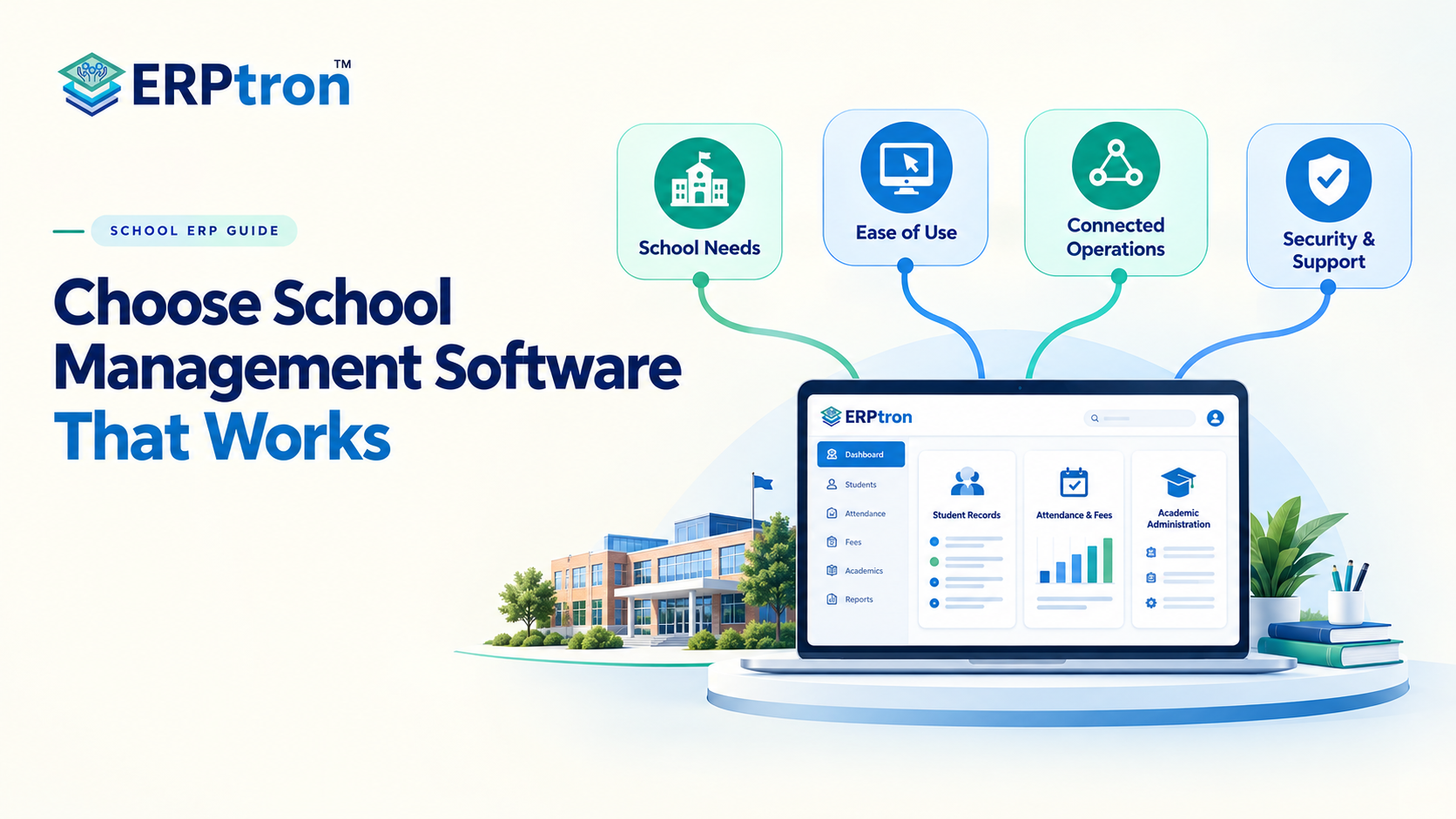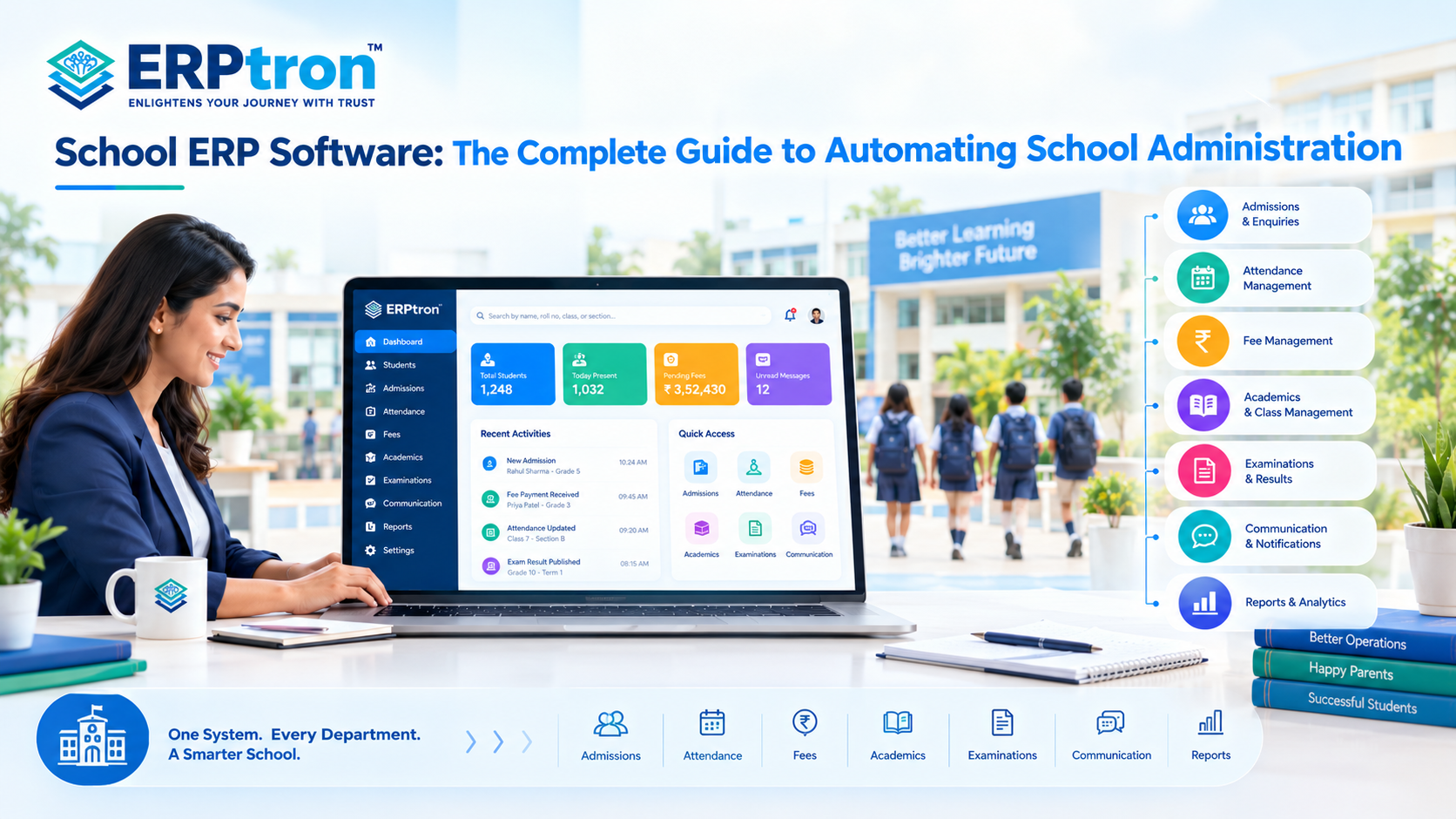

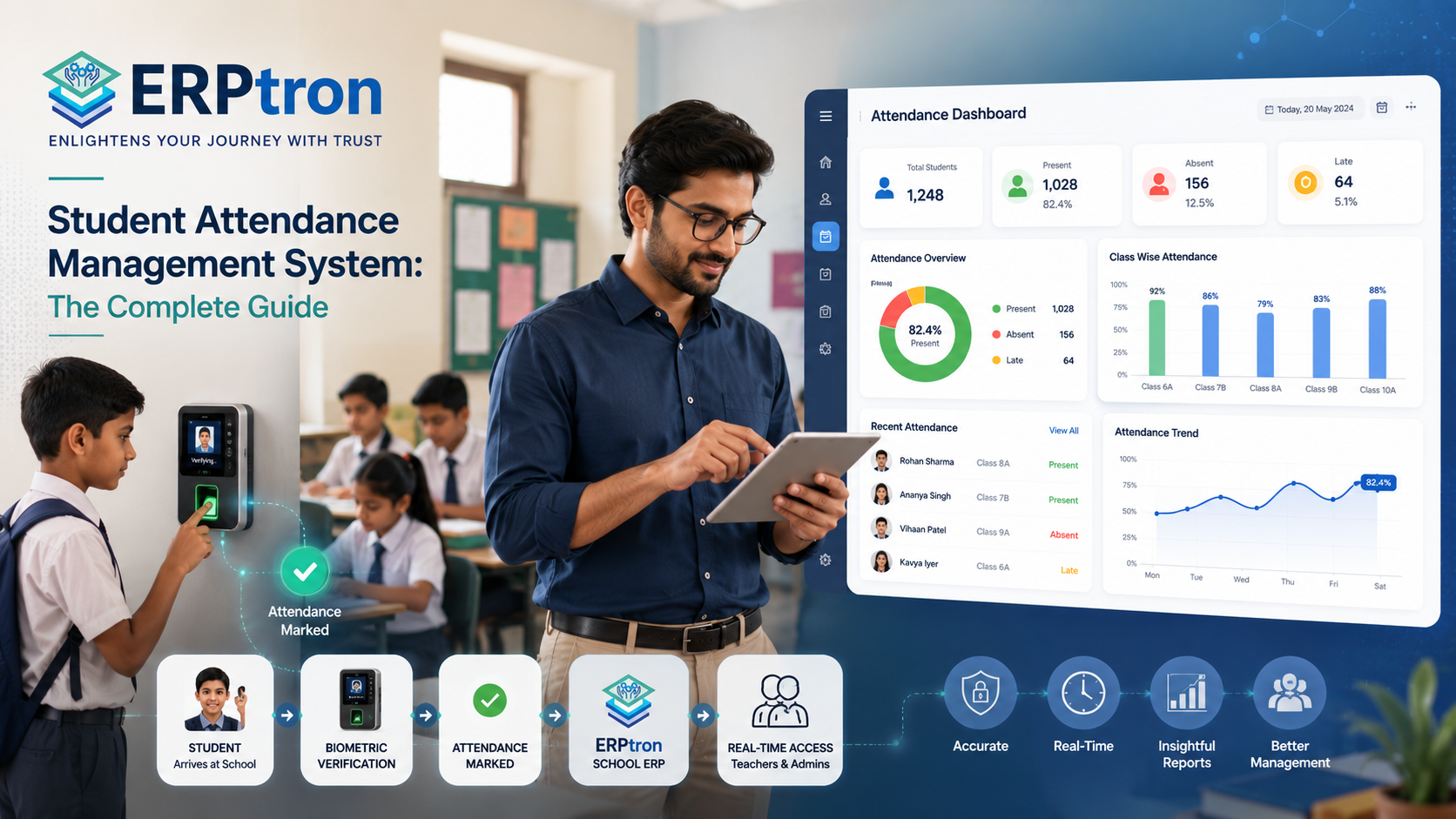
Running a school is not just about managing classrooms. Every day, schools have to manage students, teachers, attendance, fees, admissions, exams, communication, and countless administrative tasks.
When all of this is handled through registers, spreadsheets, paper forms, and various applications, even simple tasks can take longer than they should.
This is where School Management Software can make a real difference.
It brings important school operations into one organized digital system, helping schools reduce manual work, find information faster, improve communication, and manage daily operations more smoothly.
But choosing the right software is not about picking the system with the longest feature list. It is about finding a solution that actually makes the school easier to manage.
In this guide, let’s explore what School Management Software is, why schools need it, its key features and benefits, and how to choose the right solution.
What Is a Student Attendance Management System?
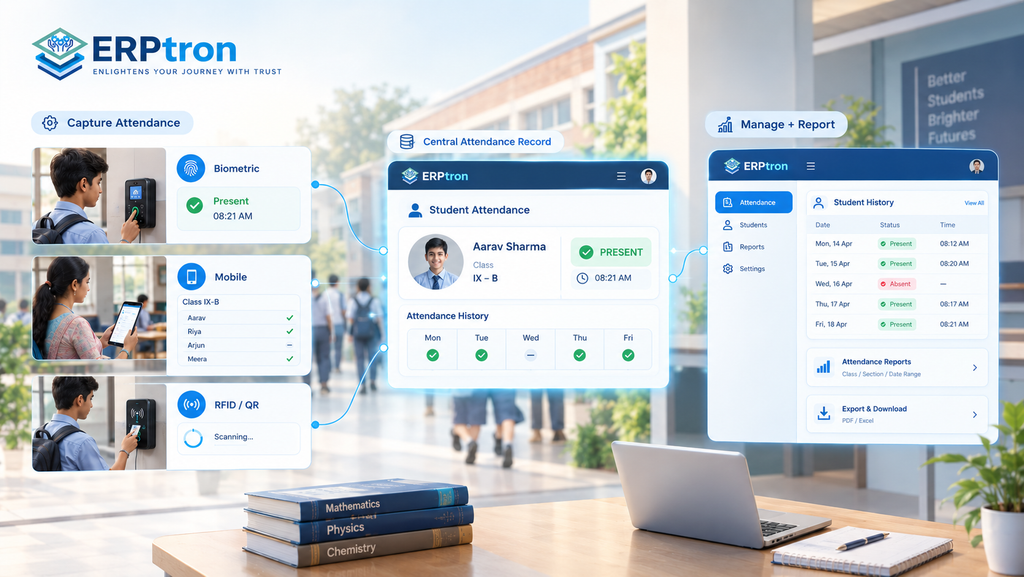
A Student Attendance Management System is a digital solution that helps schools record, track, manage, and report student attendance.
Instead of using only paper registers or spreadsheets, schools can maintain attendance records in one centralized system. This makes attendance information easier to access, update, and manage.
Depending on the software, attendance can be recorded through a mobile app, web interface, biometric device, RFID, QR code, or other digital methods.
However, the method used to record attendance and the system used to manage it are not always the same. A biometric device, for example, may capture attendance, while the software manages the records and reports.
What Does an Attendance Management System Do?
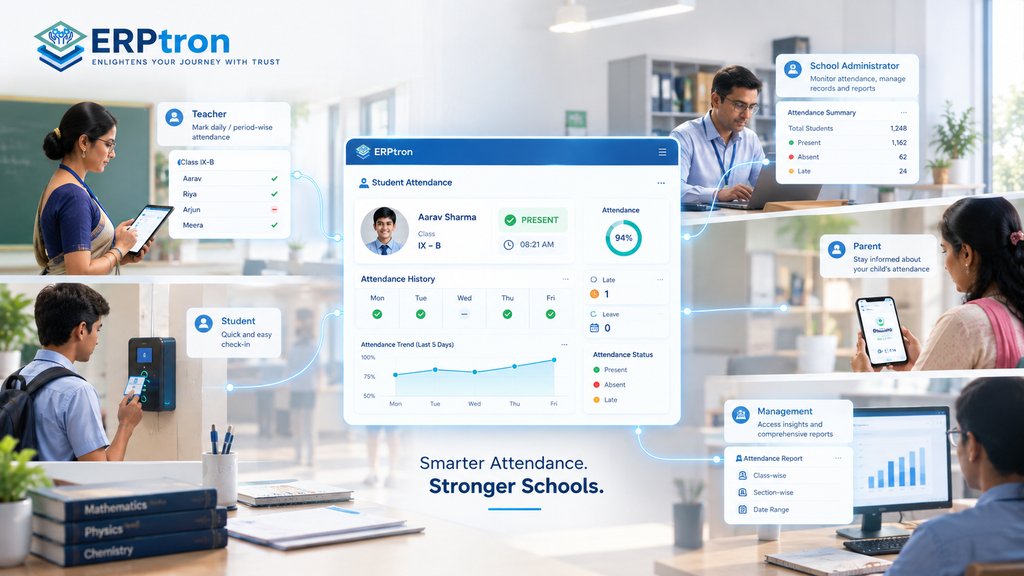
A modern Student Attendance Management Software can do much more than mark students present or absent. It can help schools maintain attendance history, track absences and late arrivals, calculate attendance percentages, generate reports, and provide useful attendance information.
Depending on the platform, it may also support parent notifications, attendance dashboards, leave management, and integration with other School ERP modules.
Who Uses Student Attendance Software?
Attendance information is useful to different people across the school. Teachers, administrators, principals, parents, and IT teams may all use the system in different ways.
Each user can access the information and features relevant to their role.
Teachers: Teachers usually use the attendance system to mark daily or period-wise attendance and view their class records. The process should be quick and simple so teachers can spend less time on administration and more time with students.
School Administrators: Administrators can use the system to monitor attendance, manage records, generate reports, and review attendance history. It can also help them identify attendance issues and keep school records organized.
Principals and Directors: School leaders can use attendance data to understand overall attendance trends across classes and sections. This can help them identify areas that need attention and make better-informed decisions.
Parents: Parents can use the system to check their child’s attendance and stay informed about absences. Depending on the platform, they may also receive attendance notifications through a mobile app or other communication channels.
IT Administrators: IT teams can manage user accounts, access permissions, system settings, and other technical requirements. They may also support integrations with biometric devices, mobile apps, or the school’s wider School ERP.
Why Do Schools Need Digital Attendance Management?
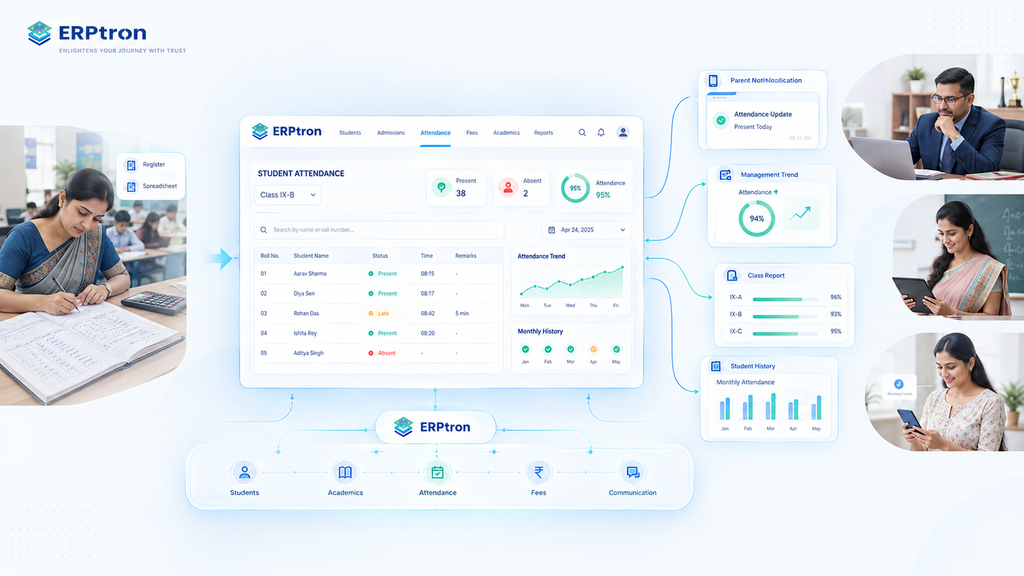
Attendance may seem like a simple daily task, but managing it manually can become difficult as a school grows. Paper registers, spreadsheets, and manual reports can take time and make it harder to track attendance across students, classes, and the school.
Manual Attendance Takes Valuable Teaching Time
In a traditional classroom, teachers may need to call names, mark the register, calculate attendance, and submit records. Each session may take only a few minutes, but those minutes add up across different classes and school days. A School Attendance Management System can make the process faster and more organized.
Paper Registers Are Difficult to Analyze
A paper register can show who was present or absent on a particular day. But finding attendance trends, checking a student’s history, or comparing attendance across classes can require additional manual work. Digital attendance records make this information easier to search, organize, and review.
Manual Attendance Can Lead to Errors
Manual attendance can sometimes result in missed entries, incorrect markings, duplicate records, or calculation mistakes. A digital system can provide a more structured way to record and manage attendance. It may not remove every error, but it can make records easier to review and correct.
Parents May Not Know About Absences Quickly
When attendance is recorded only in a physical register, parents may not know about an absence until much later. Where supported, digital attendance systems can send timely notifications or make attendance information available through a parent app.
School Leaders Need Better Visibility
Principals and school administrators may want to know which classes have lower attendance or whether absenteeism is increasing. This can be difficult when information is spread across registers and spreadsheets.
A centralized School Attendance Software solution can make attendance information easier to monitor and help school leaders identify areas that need attention.
Attendance may look like a simple daily task, but the information generated through it can become difficult to manage when schools depend on manual processes.
How Does a Student Attendance Management System Work?
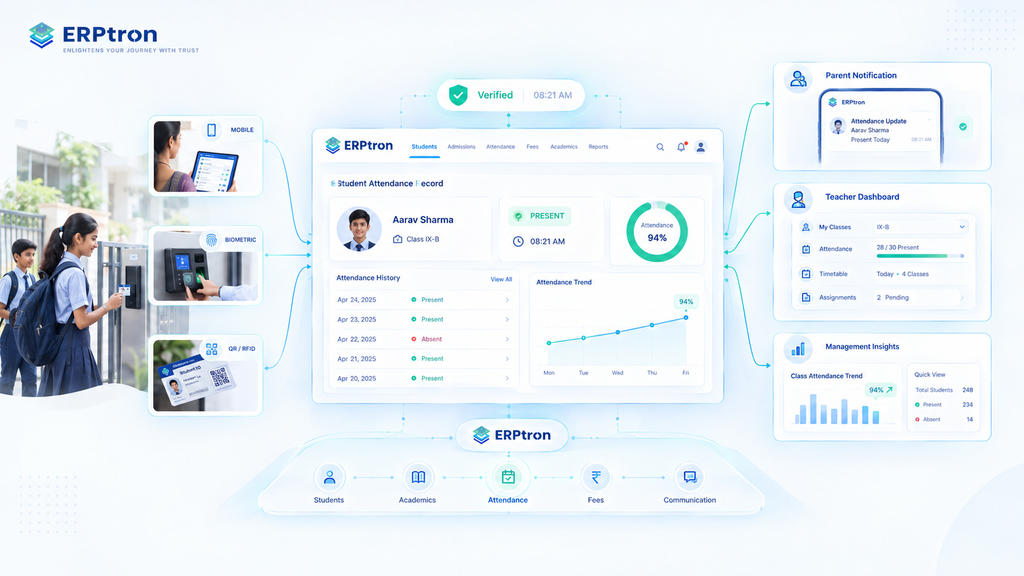
A Student Attendance Management System helps schools record, manage, and monitor attendance digitally. The exact process depends on the school’s requirements, but a typical system follows a simple workflow.
Student and Class Data
The system stores basic information such as student names, classes, sections, teachers, and academic sessions. This information helps the system record attendance against the correct student and class.
Attendance Capture
Teachers or authorized users record attendance using the school’s chosen method. This may include a mobile app, a web interface, a biometric device, RFID, a QR code, or another digital method.
Attendance Verification
The system records the attendance based on the selected process. Depending on the method, attendance may be verified by a teacher, device, or another approved method.
Attendance Update
After attendance is recorded, the information is updated in the system. Where real-time updates are supported, authorized users can access the latest attendance information without waiting for manual updates.
Parent Communication
If parent notifications are enabled, the system can share relevant attendance updates with parents or guardians. For example, parents may receive a notification when their child is marked absent.
Attendance Monitoring
Teachers and administrators can view attendance based on their roles and permissions. They can check individual students, classes, sections, and attendance history.
Attendance Reporting
The system can generate attendance reports and summaries. These may include student-wise, class-wise, section-wise, or period-wise reports, depending on the platform.
Follow-Up
Schools can use attendance information to identify students or patterns that may need attention. The software does not solve attendance problems on its own. Instead, it gives schools clear, organized information to understand attendance and take the right action.
Different Types of Student Attendance Systems
Schools can use different types of digital attendance systems depending on their size, budget, infrastructure, and daily requirements.
Manual Digital Attendance
In this method, teachers mark attendance using a mobile app, tablet, computer, or web dashboard instead of a paper register. It is a simple option for schools that want to digitize attendance without using additional hardware.
Biometric Attendance System
A Biometric Attendance System for Schools records attendance using biometric identification such as fingerprints or facial recognition. It can reduce manual work and make attendance faster. However, schools should also consider hardware, maintenance, privacy, and data security.
RFID or Card-Based Attendance
RFID or card-based systems use RFID cards or smart cards to record attendance. Students use their assigned cards to register attendance. Schools should consider the required hardware, card management, and system integration before choosing this option.
QR-Based Attendance
QR-based attendance uses QR codes to record attendance. It can be simple and convenient, but schools should consider how the system verifies students and prevents misuse.
Mobile-Based Attendance
With mobile attendance, teachers can mark attendance using a mobile phone or tablet. This can be useful for schools that want a simple digital solution without installing specialized hardware.
Real-Time Attendance Management
Real-Time Attendance means attendance information becomes available quickly after it is recorded. It is important to understand that real-time attendance is not a specific attendance method.
- Biometric = How attendance is captured
- Real-Time = How quickly attendance information is available
For example, both a biometric device and a teacher’s mobile app can support real-time attendance.
Key Features of a Student Attendance Management System
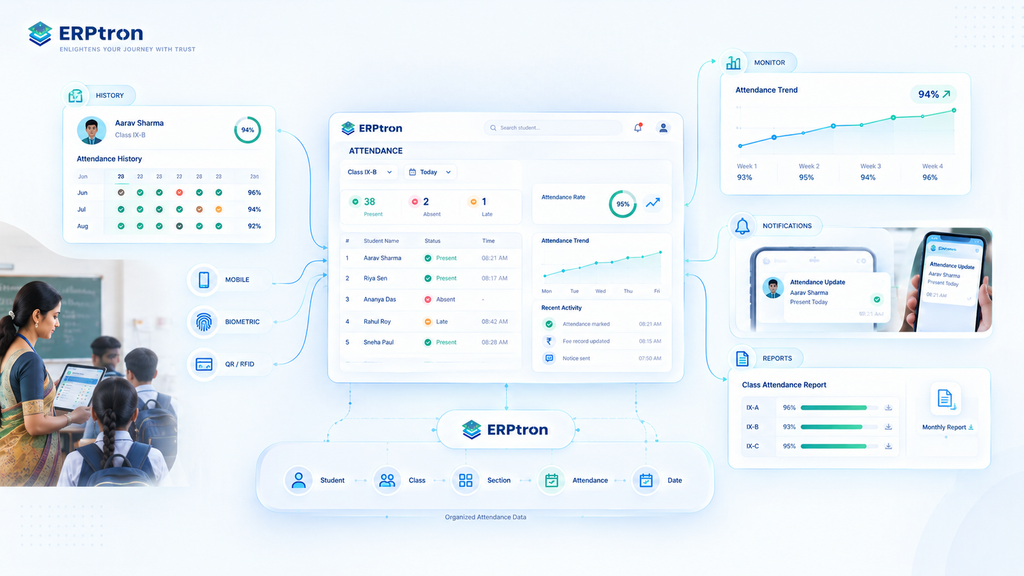
A modern attendance system should do more than replace a paper register. It should make attendance easier to record, manage, monitor, and understand.
Real-Time Attendance Platform
For ERPtron, the Real-Time Attendance Platform focuses on bringing attendance information into one organized digital system. It can provide centralized records, real-time visibility, attendance monitoring, and reports. The exact capabilities depend on the system and its setup.
Digital Attendance Recording
Teachers can record attendance digitally instead of using paper registers. The system can organize attendance by class, section, date, and academic session, making records easier to manage and access.
Student Attendance History
Authorized users can view a student’s attendance history, including present days, absent days, late arrivals, and attendance percentage, where supported. This helps schools understand a student’s attendance over time.
Absence Management
Digital attendance software can help schools identify absent students and track repeated absences. This makes it easier for teachers and administrators to notice attendance patterns that may need attention.
Late Attendance Management
Where supported, schools can record late arrivals and time-based attendance information. This helps schools track repeated late attendance separately from regular absences.
Attendance Reports
Schools can generate reports such as student-wise, class-wise, section-wise, monthly, and academic-year reports. These reports can help teachers, administrators, and management review attendance more easily.
Attendance Dashboard
An attendance dashboard can provide a quick overview of important information such as Total Students | Present | Absent | Late | Attendance Rate. This allows school staff to understand attendance at a glance.
Parent Notifications
Where supported, the system can send parents absence notifications, attendance updates, and important alerts. This helps parents stay informed without relying entirely on manual communication.
Teacher Mobile App
A Teacher Mobile App can allow teachers to mark and review attendance from their phones or tablets. The app should be simple and quick to use so attendance does not take unnecessary classroom time.
Role-Based Access
Different users may need different levels of access. For example, teachers, administrators, principals, and parents may each see different attendance information based on their roles.
Attendance Correction
Attendance records may sometimes need to be corrected. Where supported, the system can provide correction requests, authorized changes, and record history to make corrections more controlled and transparent.
Benefits of Student Attendance Management Software
Student Attendance Software can make attendance easier to manage for teachers, administrators, school leaders, parents, and students. The benefits depend on the features and implementation of the system.
Benefits for Teachers
Teachers can mark attendance faster, reduce paperwork, and access attendance records more easily. This can save time and reduce repetitive administrative work. A simple system should make attendance easier without adding another complicated task to the teacher’s day.
Benefits for School Administrators
Administrators can manage attendance records in one place and generate reports more easily. They can also monitor attendance across different classes and sections. This reduces the need to collect information manually from multiple registers or spreadsheets.
Benefits for Principals and Directors
School leaders can get a clearer view of overall attendance through reports and attendance trends. This can help them identify areas that may need attention. Better access to attendance information can also support more informed school-level decisions.
Benefits for Parents
Parents can have easier access to their child’s attendance information. Where notifications are supported, they can also receive timely updates about absences or attendance. This can improve communication between the school and home.
Benefits for Students
Students can benefit from more organized and accurate attendance records. They may also be able to view their attendance history where the system provides student access. This can make attendance information easier to understand and review when needed.
Manual Attendance vs Digital Attendance
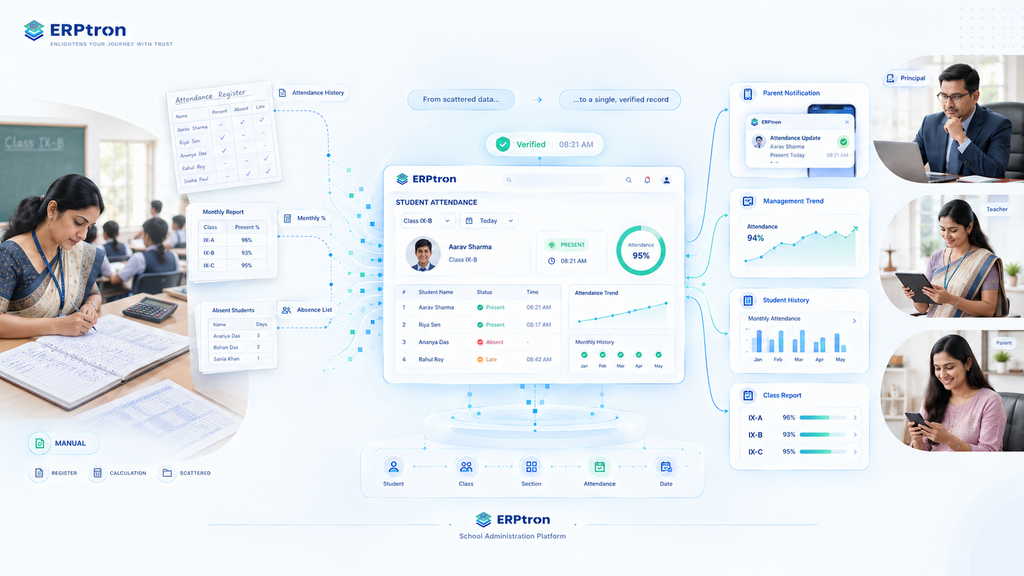
| Attendance Process | Manual Method | Digital Method |
| Attendance Recording | Register | App, web, or device |
| Attendance History | Physical records | Centralized digital records |
| Calculating Percentage | Manual | Automated where supported |
| Absence Tracking | Manual | System-based |
| Parent Notification | Manual | Digital where supported |
| Reporting | Time-consuming | Automated reports where supported |
| Management Visibility | Limited | Centralized |
| Data Analysis | Difficult | Easier |
How Does Attendance Management Software Help Identify Attendance Problems?
Digital attendance does more than record who is present or absent. Because attendance data is stored in an organized way, schools can review patterns over time and identify areas that may need attention.
Repeated Absences
A student’s attendance history can help teachers and administrators notice repeated absences. This makes it easier to identify students who may need follow-up.
Frequent Late Arrivals
Where late attendance is recorded, schools can identify students who are regularly arriving late. This can help staff understand the pattern and take appropriate action.
Class-Level Attendance Trends
Administrators can review attendance by class or section. This can help them understand whether certain classes have lower attendance than others.
Long-Term Attendance Changes
Looking at attendance over several weeks or months can help schools notice whether attendance is improving, declining, or remaining consistent.
Identifying Attendance Patterns
Organized attendance data can help schools identify students or groups that may need additional attention. Reports and dashboards can make these patterns easier to spot.
Attendance Reports Schools Should Track
A School Attendance Tracking Software solution becomes more useful when it provides reports that answer real questions and help schools understand attendance clearly.
Student-Level Reports
These reports can show a student’s attendance percentage, days present, days absent, and late arrivals. They help authorized staff understand an individual student’s attendance history.
Class-Level Reports
Schools can review daily attendance, class attendance rates, and absence trends. This gives teachers and administrators a clearer view of attendance across different classes and sections.
School-Level Reports
School management may need to review overall attendance, monthly trends, and attendance comparisons. These reports can help leadership understand attendance across the institution.
Management Reports
Leadership may also use attendance summaries, students requiring attention, and class or department comparisons. The goal of reporting is not to create more spreadsheets. It is to make attendance information easier to understand and use.
How to Choose the Right Student Attendance Management System?
Choosing an Online Attendance Management System is not just about comparing feature lists. Schools should choose a system that fits their actual attendance process and is easy for teachers and administrators to use.
Understand Your Current Attendance Process
First, understand how attendance works today. Look at who records attendance, how it is recorded, where the information is stored, who reviews it, and how parents are informed. This can help identify delays and unnecessary manual work.
Choose the Right Attendance Method
Schools can consider different options such as teacher-based attendance, mobile attendance, biometric, RFID, QR-based, or hybrid systems. The right choice depends on the school’s size, infrastructure, budget, and requirements.
Consider School Size
A small school may have different needs from a large or multi-campus institution. Choose a system that can handle the school’s current requirements and support future growth.
Check Ease of Use
One of the most important questions is: Can teachers mark attendance quickly without disrupting the class? A system may have many features, but it should still be simple and practical for everyday use.
Check Real-Time Visibility
Find out whether authorized users can access updated attendance information when they need it. This can help teachers, administrators, and management stay informed.
Review Reporting Options
Check whether the system provides useful reports such as student-wise, class-wise, monthly attendance, attendance percentage, and absence trends.
Check Parent Communication
If parent notifications are important, understand what attendance information can be shared, when notifications are sent, and which users receive them.
Evaluate Security and Privacy
Schools should check authentication, access control, data protection, record security, and backup practices. If biometric attendance is used, biometric-data protection should also be evaluated.
Check Integration
A good attendance system may need to work with other school systems, such as the Student Information System, School ERP, Teacher App, and Parent App. Check what integrations are supported.
Ask for a Live Demo
Instead of asking vendors to show individual features, give them a real example: “Show us how a teacher marks attendance, how an absence is recorded, how an administrator views it, and how the parent receives the update.” This gives the school a better understanding of how the complete attendance process works in practice.
Biometric Attendance vs Digital Attendance vs Real-Time Attendance
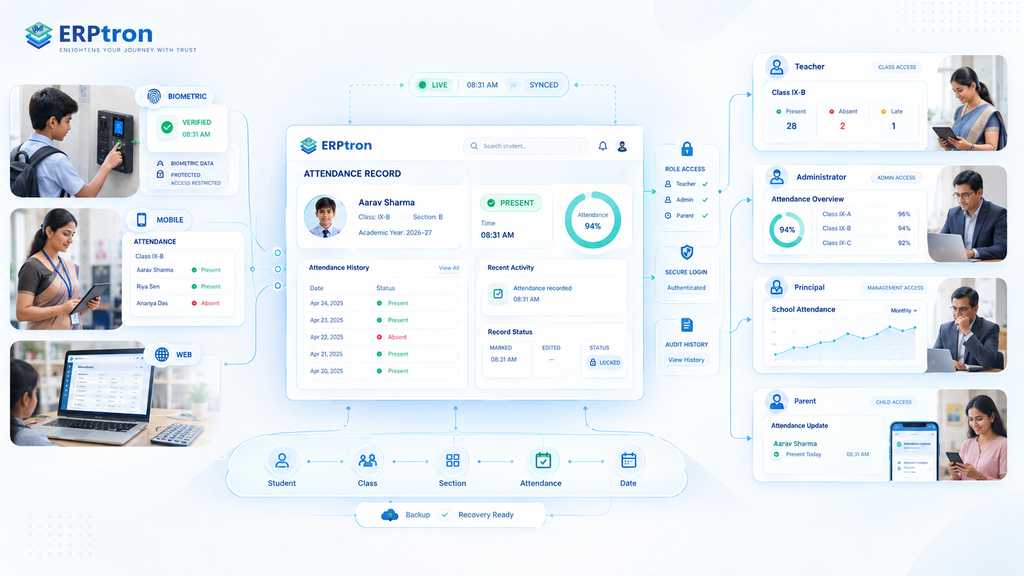
These terms are often used together, but they mean different things.
Digital Attendance means attendance is recorded electronically instead of using a paper register. Teachers can mark attendance using a mobile app, computer, tablet, or web system.
Biometric Attendance means the system identifies students using methods such as fingerprint or facial recognition before recording attendance.
Real-Time Attendance means attendance information becomes available quickly after it is recorded. For example, an administrator or parent may be able to see an absence shortly after attendance is marked.
Automated Attendance means less manual work is needed. For example, a biometric device can identify a student and record the attendance automatically.
These methods can work together. A school can use biometric technology to record digital attendance and make the information available in real time.
Security and Privacy in Student Attendance Systems
Attendance information belongs to students, so schools should take reasonable steps to keep it secure and accessible only to authorized users. This becomes even more important when attendance is connected with a School ERP or uses biometric technology.
Role-Based Access
Different users need different information. Teachers may need access to their classes, while administrators and school leaders may need broader attendance reports. Parents should generally have access only to information relevant to their child.
Secure Login
The system should use appropriate authentication to help prevent unauthorized access. Schools should also review how user accounts, passwords, and permissions are managed.
Data Protection
Schools should understand how attendance data is stored, transferred, and protected. They should also review the data-protection practices of the software provider.
Attendance Record Protection
Attendance records should not be changed without proper authorization. If corrections are allowed, the system should provide a controlled process for making and reviewing changes.
Biometric Data
If a school uses biometric attendance, it should understand what biometric information is collected, where it is stored, who can access it, and how the provider protects it.
Biometric attendance can be convenient, but schools should consider its privacy and data-handling requirements before implementation.
Backup and Recovery
Schools should also understand how attendance records are backed up and how they can be recovered if data is lost or a system problem occurs.
Attendance Security Checklist
Schools should choose an attendance system with secure login, role-based access, protected attendance records, and regular backups. If biometric attendance is used, the system should also have proper safeguards for biometric data.
Implementing a Student Attendance Management System
Introducing a Digital Attendance System for Schools should be planned carefully. The goal is not simply to install software, but to make the attendance process easier and more organized.
Assess the Current Process: Start by understanding how attendance is recorded today, where records are stored, who manages them, and what problems teachers and administrators face.
Define the Attendance Rules: Schools should clearly define how they handle present, absent, late, leave, and attendance corrections. Clear rules make it easier to configure the software correctly.
Choose the Attendance Method: Choose a method that fits the school’s needs. Options may include teacher-based, mobile, biometric, RFID, QR-based, or hybrid attendance.
Set Up Student and Class Information: Before using the system, add the required student records, classes, sections, and academic sessions. Accurate information provides a strong foundation for attendance management.
Set Up Users and Permissions: Create appropriate access for teachers, administrators, principals, parents, and other authorized users. Each user should only see the information relevant to their role.
Train Teachers: Teachers are central to the attendance process. They should know how to record attendance, review records, make permitted corrections, and follow the school’s attendance rules.
Run a Pilot: Start with a small number of classes or sections before rolling out the system across the entire school. A pilot can help identify usability issues, configuration problems, and reporting gaps.
Roll Out the System: After reviewing the pilot and making necessary changes, the school can gradually introduce the system across other classes and departments.
Monitor Usage: After implementation, schools should review attendance completion, corrections, errors, user adoption, and parent communication.
Common Mistakes Schools Make When Choosing Attendance Software
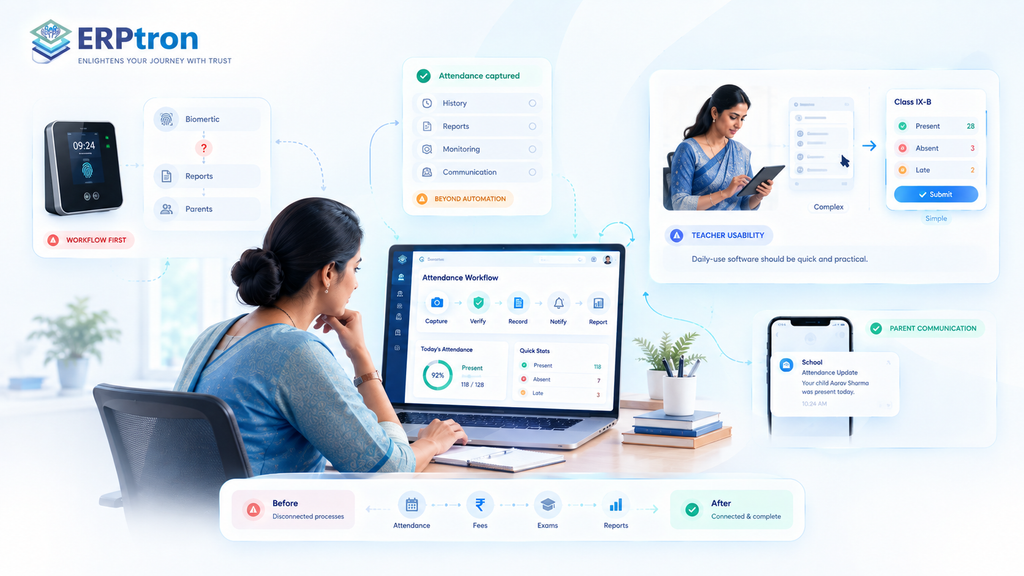
Before choosing Attendance Software, schools should look beyond features and technology. Understanding common mistakes can help schools avoid unnecessary costs, implementation problems, and systems that do not fit their daily workflow.
Choosing Hardware Before Understanding the Workflow
A biometric device alone does not create a complete attendance system. Schools should first understand the full process of recording, monitoring, reporting, and communicating attendance before choosing the right technology.
Focusing Only on Automation
Automated attendance can save time, but schools also need attendance history, reports, monitoring, communication, and proper access controls. The complete workflow is more important than automation alone.
Ignoring Teacher Usability
Teachers use attendance systems every day, so the process should be quick and simple. If the system is complicated or takes too long, adoption can become difficult.
Ignoring Parent Communication
Attendance becomes more useful when important updates can reach parents through appropriate communication channels. Schools should check what notification options the system provides.
Not Checking Data Security
Attendance information contains student data. Schools should understand how the system protects records, manages access, and handles backups.
Choosing a Standalone System Without Considering Integration
A separate attendance system can create another data silo. Schools should check whether attendance can connect with their wider School Management System and student records.
Not Testing Attendance Corrections
Mistakes can happen when attendance is recorded. Schools should understand how correction requests, approvals, and record changes are handled.
Ignoring Future Growth
A system that works for a small school may not meet the needs of a larger or multi-campus institution. Schools should consider their future requirements before making a long-term decision.
How to Measure the Success of a Digital Attendance System?
A Digital Attendance System should not be judged simply by whether the school has stopped using paper registers. The real measure of success is whether the system makes attendance easier, faster, and more useful.
Schools can look at time taken to record attendance, attendance completion, data-entry errors, reporting time, attendance corrections, parent notifications, teacher adoption, and administrative workload.
These measures can help schools understand whether the system is actually saving time, reducing errors, and making attendance information easier to manage.
Key Question: “Has the system made attendance more accurate, accessible, and useful?”
That is a better measure of success than simply moving from a paper register to digital software.
Student Attendance Management as Part of a School ERP
Attendance should not have to work as a separate system. In a connected School Management Platform, attendance can work together with student information, classes, teachers, communication, academics, and reports.
For example, a student’s information can connect their student record, class, teacher, attendance, parent communication, academic information, and reports within the same digital environment.
When these areas are connected, schools can reduce duplicate data entry and avoid maintaining the same information across different systems.
For ERPtron, the Real-Time Attendance Platform can form part of its broader school management ecosystem, helping schools bring attendance into a more connected digital workflow.
The goal is not just to digitize attendance. It is to make attendance information useful across the school.
A school may have digital attendance but still use separate systems for student records, academics, communication, and administration. Connecting these areas can make school operations more organized and easier to manage.
Student Attendance Software for Different Types of Schools
Different schools have different attendance needs. The right Student Attendance Software should match the school’s size, workflow, infrastructure, and plans.
Small Schools
Small schools may mainly need simple digital attendance, easy-to-use tools, basic reports, and low infrastructure requirements. A teacher-based mobile or web system may be enough for their daily needs.
Growing Private Schools
Growing schools may need mobile access, parent communication, better reporting, and scalability. As the number of students and classes increases, having attendance information in one system can make management easier.
Large K–12 Schools
Large schools may need to manage many classes, sections, teachers, and students. They may benefit from centralized attendance, detailed reports, user permissions, and integration with other school systems.
Multi-Campus Institutions
Multi-campus schools may need centralized visibility with campus-level access. Management can view overall attendance, while authorized staff can manage information for their respective campuses.
Schools Considering Biometric Attendance
Schools considering biometric attendance should look at infrastructure, student movement, hardware, data protection, maintenance, and integration. Biometric technology should be chosen because it fits the school’s needs, not simply because it is a newer technology.
Student Attendance Management System Checklist
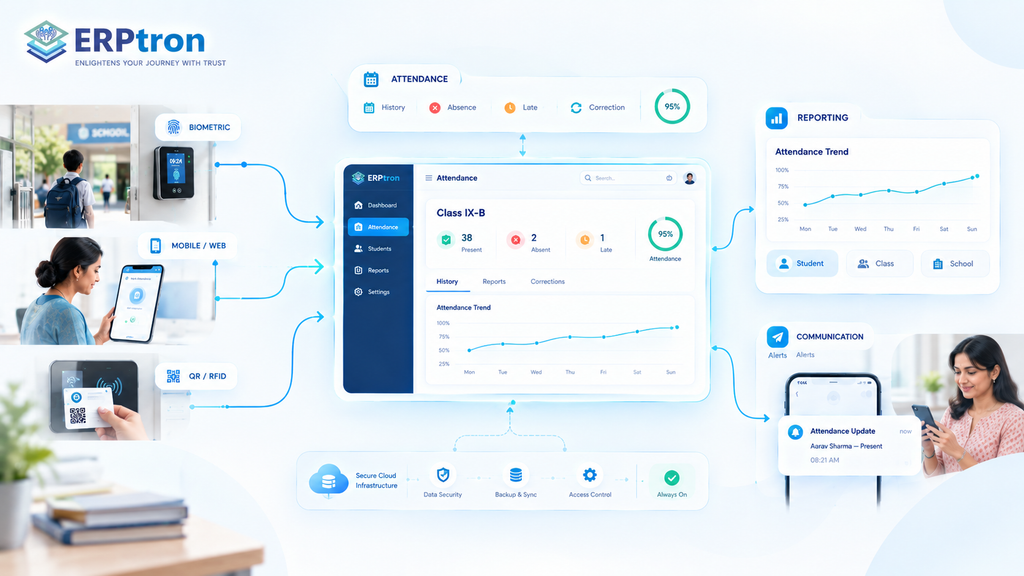
When evaluating a Student Attendance Management System, schools should look beyond the number of features. The system should be easy to use, fit the school’s attendance process, protect student information, and provide useful information for teachers and administrators.
Attendance
The basic attendance features should make it easy for schools to record and manage daily attendance. Look for digital attendance, student attendance history, absence tracking, late tracking, attendance percentages, and attendance correction options. A good system should allow authorized users to understand a student’s attendance history without depending on paper registers or separate spreadsheets.
Reporting
Attendance reports help schools turn daily records into useful information. Schools may need student-wise reports, class-wise reports, school-level reports, attendance trends, and dashboards. These reports can help teachers and administrators understand attendance patterns and give school management a clearer view of attendance across the institution.
Communication
Attendance information can become more useful when it is connected with communication. Schools should check whether the system supports parent notifications, attendance alerts, and teacher communication. This can help parents stay informed about important attendance updates and reduce the need for manual communication.
Technology
Schools should also evaluate the technology behind the system. Important areas include mobile access, real-time updates, security, backup, scalability, and integration. The system should work reliably for daily use and be able to support the school’s changing requirements as the number of students, teachers, and classes grows.
Attendance Methods
Different schools may prefer different ways of recording attendance. Depending on their requirements, they may consider biometric, RFID, QR-based, mobile, or web-based attendance.
Schools should choose the method that fits their workflow, infrastructure, budget, and operational needs rather than selecting a technology simply because it appears more advanced.
The best attendance system is not necessarily the one with the most technologies.
It is the one that fits the school’s workflow, is easy for teachers to use, provides useful information, protects student data, and can support future needs.
How Does ERPtron Simplifies Student Attendance Management?
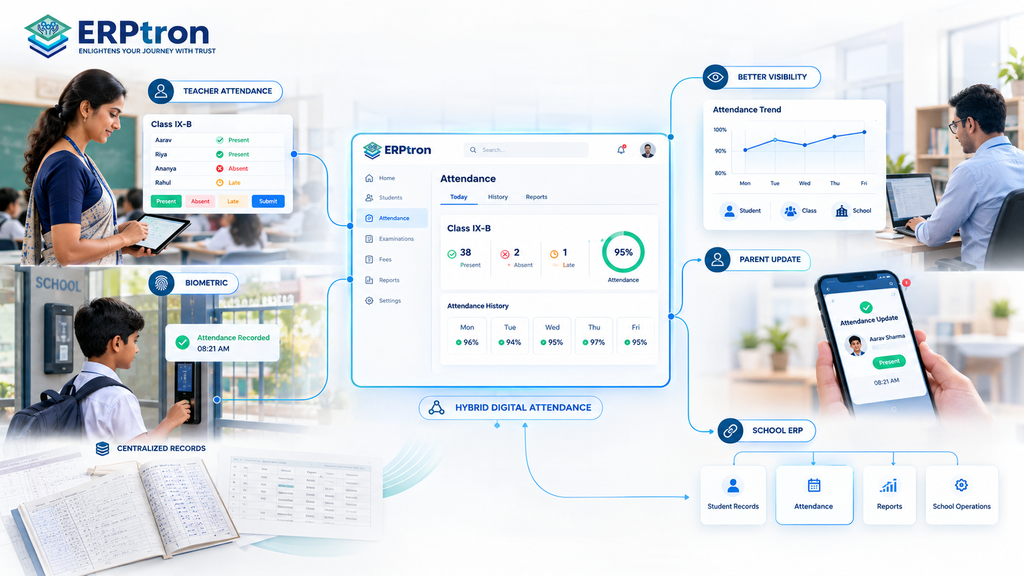
Attendance is a daily responsibility for every school. Teachers need to record student attendance, administrators need to monitor records, and parents may need updates about their child’s attendance.
Managing all of this through paper registers or separate systems can take time and create unnecessary administrative work. ERPtron’s Hybrid Digital Attendance Platform helps schools move attendance management into a centralized digital environment.
Hybrid Digital Attendance Platform
Hybrid Digital Attendance Platform gives schools a flexible way to manage student attendance digitally. It brings attendance information into a centralized system, helping schools reduce their dependence on traditional paper registers.
Teacher-Based Attendance
Teachers can record attendance as part of their regular classroom activities. Digital attendance records help reduce manual paperwork and make it easier to maintain updated student attendance information.
Biometric Attendance
Schools that use biometric attendance can manage attendance information through the digital attendance environment. This can help schools maintain more structured records of student attendance and provide relevant information to authorized users.
Centralized Attendance Records
Attendance information can be maintained in one place instead of being spread across different registers or files. This makes it easier for authorized administrators to access, review, and manage attendance records.
Better Attendance Visibility
School administrators need to understand attendance patterns and maintain proper records throughout the academic year. A centralized digital system provides easier access to attendance information and supports more efficient monitoring.
Parent Attendance Updates
Parents also need to stay informed about their child’s attendance. ERPtron’s connected digital environment can help provide relevant attendance updates, allowing parents to stay aware of their child’s attendance status.
Reduce Paperwork
Recording attendance manually every day can create repetitive work for teachers and administrative staff. Digital attendance reduces the need for physical registers and makes routine attendance management easier.
Reduce Repetitive Administrative Work
Attendance information often needs to be maintained and reviewed regularly. By managing attendance digitally, schools can reduce repetitive recordkeeping and spend less time handling routine administrative tasks.
Connect Attendance with the School ERP
Attendance becomes more useful when it works alongside other school processes. ERPtron’s Hybrid Digital Attendance Platform can connect with the wider School ERP ecosystem, allowing attendance information to work alongside student records and other school-management activities.
FAQs
1. What is the difference between biometric and digital attendance?
Digital attendance means attendance is recorded electronically. Biometric attendance is one method that uses fingerprints, facial recognition, or other biometric identification.
2. Can teachers mark attendance using a mobile app?
Yes, if the selected attendance system provides a teacher mobile app. Teachers can record attendance directly from their mobile devices.
3. Is biometric attendance necessary for every school?
No. Biometric attendance is only one option. Schools should consider their size, infrastructure, workflow, privacy needs, and requirements before choosing an attendance method.
4. Can attendance software integrate with a School ERP?
Yes, depending on the platform. Attendance can be connected with student records, teacher workflows, parent communication, and other School ERP functions.
5. How much does student attendance management software cost?
The cost depends on school size, attendance method, hardware, features, implementation, integrations, and support. Schools should consider the total cost rather than just the software price.
Conclusion: From Attendance Recording to Attendance Intelligence
A modern attendance system should do more than mark students present or absent. It should help schools record, manage, monitor, and understand attendance more effectively.
For teachers, this can mean faster attendance and less paperwork. For administrators, it can mean better records and easier reporting. For parents, it can provide timely attendance updates.
The goal is simple: create a reliable attendance system that connects people, information, and school processes.
Looking to modernize student attendance management? Explore ERPtron’s Real-Time Attendance Platform for a more connected digital attendance experience.