


School admission is often the first major interaction between a parent and a school. A simple and well-organised process can create a positive first impression.
However, many schools still manage admissions through paper forms, spreadsheets, phone calls, and physical documents. As applications increase, these processes can take more time and become harder to track.
Online Admission Management Software can help bring the entire admission process into one organised digital system. Schools can manage enquiries, applications, documents, communication, payments, and enrolment more easily.
For parents, this can make the application process simpler. For schools, it can reduce paperwork, improve tracking, and make it easier to manage applications.
Let’s explore how online admission management works, what features schools should look for, and how it can make the admission process simpler and more efficient.
What Is Online Admission Management Software?
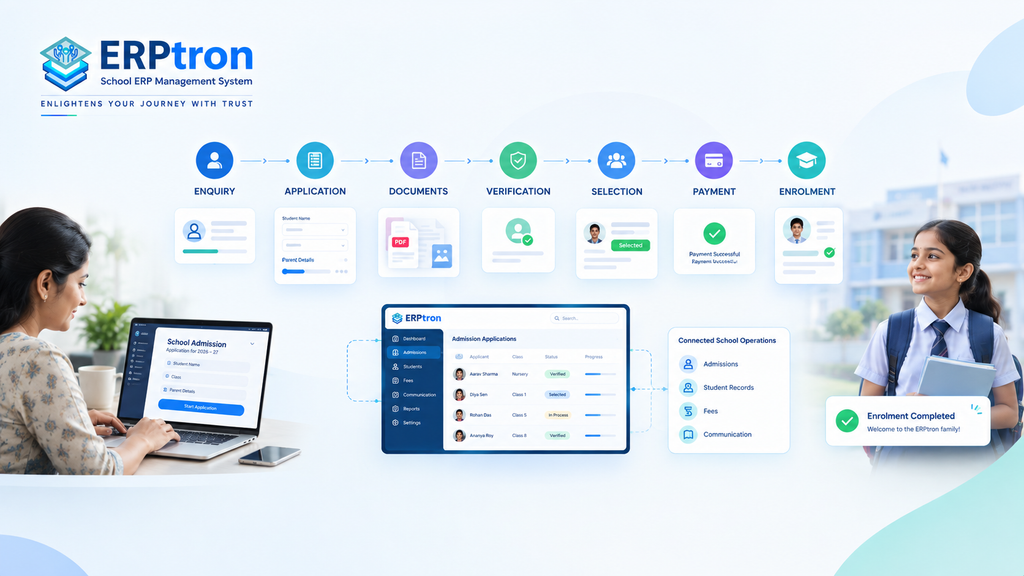
Online Admission Management Software is a digital system that helps schools manage the admission process from enquiry to enrolment.
It allows schools to manage applications, documents, verification, selection, payments, communication, and enrollment in one place.
Traditionally, schools may use paper forms, spreadsheets, emails, phone calls, and physical files. As applications increase, managing all this information can become time-consuming and difficult.
Online admission software brings these activities into one organized system. Parents can apply online and submit documents, while school staff can review applications, track progress, and manage missing information.
A typical admission process looks like:
Enquiry → Application → Documents → Verification → Selection → Payment → Enrolment
The exact process may vary between schools. The main goal is to make admissions simpler, more organized, and easier to manage.
How Does Online Admission Software Work?
The process usually starts when a parent shows interest in the school. The school can collect basic details and share the necessary admission information. Parents can then fill out the online application form and upload the required documents.
The admission team can review the application, check documents, identify missing information, and update the application status.
For example: Submitted → Under Review → Documents Pending → Shortlisted → Selected → Enrolled
Once a student is selected, the system can also help with payment and enrollment. If it is connected with a School ERP, the student’s information can move into the student record without entering the same details again.
This creates a smoother journey from applicant to enrolled student.
Who Uses Online Admission Software?
Online admission software can be used by different people involved in the admission process. Each user gets access to the information and features relevant to their role.
School Management
Principals and school directors can monitor the overall admission process. They can view enquiries, applications, admission progress, and reports. This gives management a clearer view of the admission cycle without depending on manually prepared updates.
Admission Team
Admission staff are the main users of the system. They can process applications, verify documents, update application status, and communicate with applicants. A centralized system also makes it easier to find information and manage applications without relying on multiple files and spreadsheets.
Teachers and Coordinators
Teachers or academic coordinators may be involved in interviews, entrance assessments, or student evaluations. The system can give them access to the information they need for their assigned tasks without exposing unnecessary administrative data.
Accounts Team
The accounts team can manage admission-related payments, payment status, receipts, and financial records. Connecting payment information with admission records can reduce the need to maintain separate records.
IT Administrators
IT administrators can manage users, permissions, access controls, and system settings. This helps ensure that different users have the right level of access to the system.
Parents and Applicants
Parents can use the system to complete applications, upload documents, receive updates, and check application status where supported. A simple, mobile-friendly system can make the admission process more convenient and reduce unnecessary visits to the school.
Why Do Schools Need Online Admission Management Software?
Schools handle many activities during admissions, from collecting applications and documents to checking information, communicating with parents, collecting fees, and completing enrolment. When all of this is managed manually, the process can become time-consuming and difficult to track.
- Reduce Paperwork: Schools can replace many paper forms and physical files with digital records, making information easier to store and find.
- Centralize Information: Applications, documents, payment details, and enrolment information can be managed from one place instead of multiple files.
- Reduce Data Entry Errors: Information entered once can be reused where appropriate, reducing repeated data entry and common mistakes.
- Track Applications: Staff can quickly see whether an application is submitted, under review, pending, shortlisted, selected, or enrolled.
- Manage Documents: Schools can see which documents have been submitted and which are still missing, making verification easier.
- Improve Parent Communication: Schools can provide application updates, reminders, interview details, and other important information more systematically.
- Save Staff Time: Admission teams spend less time searching through registers, spreadsheets, and files and more time processing applications.
- Improve Management Visibility: Principals and directors can get a clearer view of applications, pending cases, and confirmed admissions.
- Speed Up Processing: A connected workflow can help staff move applications from one stage to the next more efficiently.
- Connect the Admission Process: Enquiry, application, verification, payment, and enrolment can work together instead of being managed separately.
How Does an Online School Admission Process Work?
A typical Online Admission System for Schools follows a series of connected steps. The exact process can differ between schools, but the journey usually starts with an enquiry and ends with the student being enrolled.
Step 1: Admission Enquiry
The process usually begins when a parent shows interest in the school. The school can capture basic information such as the parent’s contact details, student’s name, and preferred class. This creates an initial record that the admission team can use for further communication.
Step 2: Online Application
The parent completes an online application form with the required student and parent information. This allows the school to collect information digitally instead of depending entirely on physical forms.
Step 3: Document Submission
Parents may need to submit documents such as photographs, identification, academic records, or other required documents. An online system can allow these documents to be uploaded and linked to the applicant’s record.
Step 4: Application Verification
The admission team reviews the submitted information and documents. If something is missing or incorrect, staff can identify the application and take the required action.
Step 5: Assessment or Interaction
Some schools may require an interview, entrance assessment, student evaluation, or parent interaction. The system can help the school manage these activities as part of the overall admission workflow. Not every school follows the same process, so flexibility can be important.
Step 6: Application Decision
After the required checks or assessments, the application can move to a final decision. For example, an applicant may be shortlisted, selected, waitlisted, or marked as incomplete. Recording these stages digitally makes the application status easier to track.
Step 7: Admission Fee or Payment
Selected students may need to complete an admission-related payment. Where supported, the system can record payment status, receipts, and transaction information along with the applicant’s record.
Step 8: Enrolment
Once the admission process is complete, the applicant becomes an enrolled student. Ideally, the student’s information should move into the school’s student records without requiring staff to enter the same information again.
The journey can therefore become: Enquiry → Application → Verification → Selection → Payment → Enrolment → Student Record
Key Features of Online Admission Management Software
Online admission software is more than a digital application form. A useful system should support the wider admission process, including applications, documents, tracking, communication, payments, and enrolment.
Online Application Forms
Online application forms allow schools to collect important information digitally. This may include student details, parent information, contact details, previous school information, class, and other school-specific requirements.
The ability to customize fields can be useful because different schools may collect different information. The form should also be simple enough for parents to complete without unnecessary difficulty.
Paperless Admission Platform
A Paperless Admission System goes beyond simply putting a form online. It helps schools reduce their dependence on physical forms and organize applicant information and documents digitally.
It can help with:
- Reducing paperwork
- Digital application records
- Document management
- Organized applicant information
- Easier record access
For ERPtron, this approach is represented through the Paperless Admission Platform.
Digital Enrolment System
Admission should not stop when an applicant is selected. A Digital Enrolment System can help move accepted applicants into the school’s student records without unnecessary duplicate data entry. This creates a smoother connection between the admission process and ongoing student management. For ERPtron, this is represented through the Digital Enrolment System.
Document Management
Admission applications often require several documents. A digital system can help schools collect, organize, and review these documents while making it easier to identify missing information.
It can support:
- Digital document uploads
- Document tracking
- Missing document identification
- Applicant record organization
- Document verification
Application Tracking
Admission staff need to know the current status of every application. A system can organize applications into stages such as: Submitted → Under Review → Documents Pending → Shortlisted → Selected → Enrolled
This makes it easier to see which applications are complete and which ones require further action.
Admission Dashboard
An admission dashboard can provide a quick overview of the admission process. It may show information such as total enquiries, applications received, pending applications, shortlisted applicants, and confirmed admissions. This gives school management a clearer picture of the admission process without depending entirely on manually prepared reports.
Communication Management
Communication is an important part of the admission journey. Schools may need to send application confirmations, document reminders, interview details, admission decisions, and payment instructions. A digital system can help organize these updates and reduce repetitive communication work.
Payment Management
Admission may involve fees or other payments. Where supported, the software can help schools track payment status, receipts, transaction records, and pending payments. Connecting payments with applicant records can make financial tracking easier for the school.
User Roles and Permissions
Different school employees may need different levels of access. For example, admission staff may need application access, while accounts staff may mainly need payment information. Role-based permissions can help ensure that users only access the information relevant to their responsibilities.
Reports and Analytics
Admission reports can help schools understand the overall admission process. Reports may include application numbers, class-wise applications, pending applications, selected students, confirmed admissions, and admission conversion.
How Does an Online School Admission Process Work?
A well-organized Online Admission System for Schools connects the different stages of admission in one workflow. Instead of managing enquiries, forms, documents, payments, and enrolment separately, the school can track the applicant from the first enquiry to final admission.
Step 1: Admission Enquiry
The process usually begins when a parent shows interest in the school. The school can capture basic details such as the student’s name, parent’s contact information, preferred class, and other relevant enquiry details. This creates an initial applicant record and helps the admission team follow up with interested parents.
Step 2: Online Application
The parent can complete an online application form using a computer or mobile device. The form can collect important information about the student, parents, address, previous school, and other details required by the institution. Since the information is collected digitally, staff do not have to manually enter details from a physical form into another system.
Step 3: Document Submission
After completing the application, the parent can upload the required documents. These may include photographs, identification documents, previous academic records, birth certificates, or other school-specific documents. The admission team can then view the documents along with the application and check whether all required information has been submitted.
Step 4: Application Verification
Once an application is submitted, the admission team can review the information and documents. They can check for missing details, incorrect information, or documents that need further verification. If something is incomplete, the application can be marked for follow-up. This makes it easier for staff to identify which applications need attention.
Step 5: Assessment or Interaction
Some schools may require an assessment or interaction before making an admission decision. This could include an entrance test, student evaluation, interview, or parent interaction. The system can help the school record relevant information and keep these activities connected to the applicant’s record. However, the exact process will depend on the school’s admission policy.
Step 6: Application Decision
After reviewing the application and completing any required assessments, the school can make an admission decision.
Benefits of Online Admission Management Software
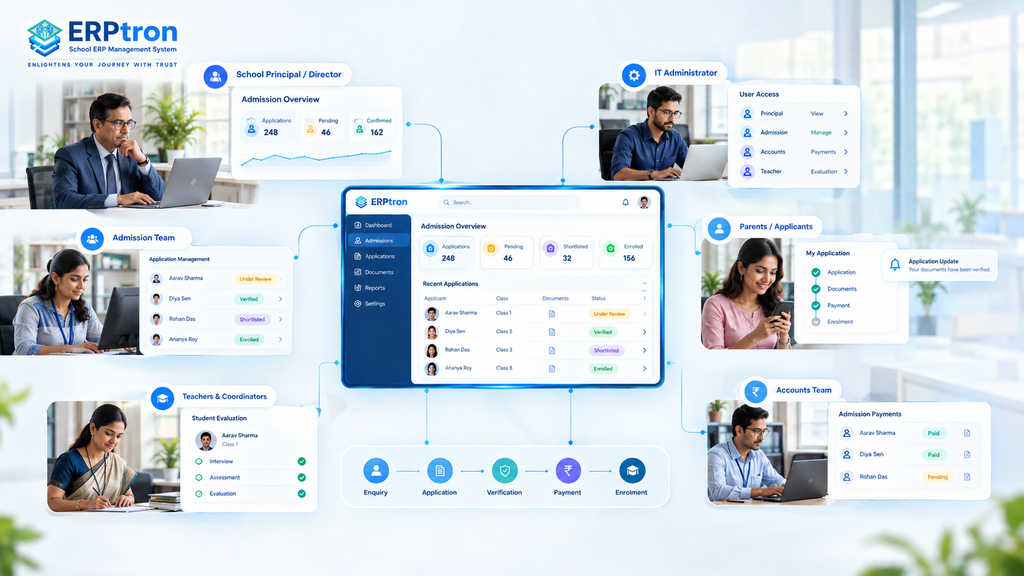
Online admission software can benefit different people involved in the admission process. The main advantage is that it can reduce manual work and bring important admission activities into one organized system.
Benefits for School Principals and Directors
School leaders can get a clearer view of the admission process. They can monitor applications, pending cases, confirmed admissions, and overall admission progress from one place. This can help them make decisions faster without waiting for information to be collected from different departments.
Benefits for Admission Teams
Admission staff can spend less time handling paperwork, searching through files, and entering the same information repeatedly. They can manage applications, documents, status updates, and communication from a centralized system, making daily admission work easier.
Benefits for Parents
Parents can complete applications from home, upload documents online, and receive important admission updates without making unnecessary visits to the school. A simple and mobile-friendly process can make the admission experience more convenient and easier to understand.
Benefits for Accounts Teams
Accounts teams can get better visibility into admission-related payments. They can track payment status, receipts, and transaction information more easily. When payment information is connected with admission records, it can also reduce the need for separate payment tracking.
Benefits for IT Administrators
IT administrators can manage users, permissions, and access from a centralized system. This can make it easier to control who can access different parts of the admission platform. A centralized system can also reduce the need to manage multiple disconnected tools and records.
Traditional Admission vs Online Admission
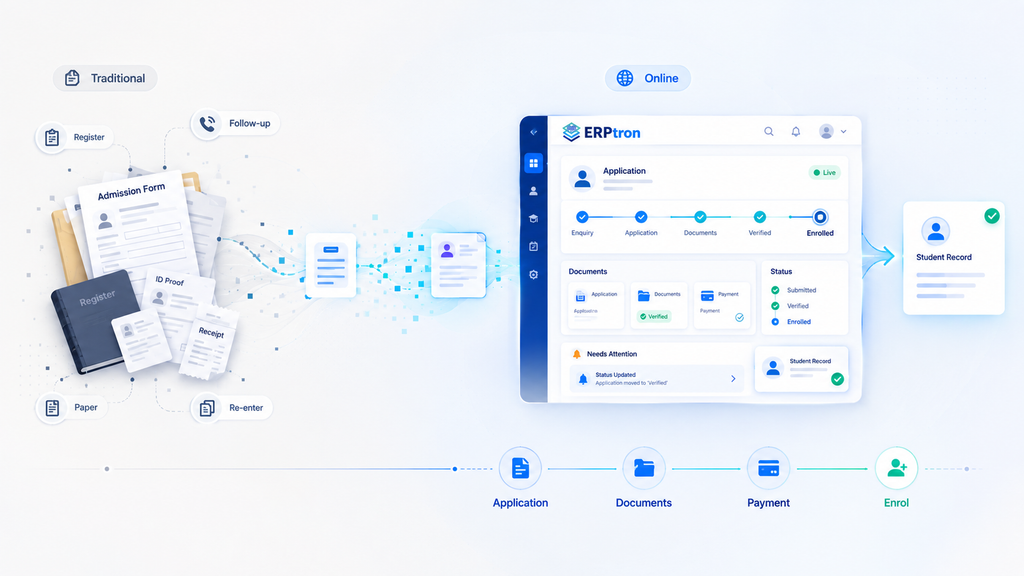
| Admission Process | Traditional Approach | Online Approach |
|---|---|---|
| Enquiry | Registers and calls | Digital enquiry capture |
| Application | Paper form | Online application |
| Documents | Physical copies | Digital submission |
| Verification | Manual tracking | Centralized application |
| Status | Calls and emails | Application status |
| Communication | Manual follow-up | Structured notifications |
| Payment | Separate records | Digital payment records where supported |
| Reporting | Manual compilation | Centralized reports |
| Enrolment | Re-enter information | Digital transition |
How Online Admission Software Improves the Parent Experience?
Parents expect school admission to be simple, convenient, and easy to understand. Since admission is often one of their first interactions with a school, a smooth digital experience can create a positive impression.
Easier Application
Online admission software allows parents to complete application forms digitally. Clear instructions, simple forms, and mobile-friendly access can make the process easier without requiring parents to visit the school for basic application tasks.
Easier Document Submission
Parents can upload required documents directly through the admission system. This reduces the need to submit physical copies and makes it easier to see which documents have already been submitted and which are still required.
Better Communication
Parents can receive important updates about their application, missing documents, interviews, admission decisions, and payments. Clear communication helps parents understand what has been completed and what they need to do next.
Fewer Unnecessary Visits
Many admission activities can be completed online. Applications, document submission, status updates, and some payment activities can be handled digitally, reducing unnecessary visits to the school.
Greater Transparency
Parents can have better visibility into the progress of their application. Knowing whether an application is under review, awaiting documents, shortlisted, or approved can reduce confusion and uncertainty.
How Online Admission Software Improves School Operations?
Online admission software can improve more than just the parent experience. It can also make everyday admission work easier and more organized for the school.
Centralized Applicant Data
Schools can keep applicant information in one centralized system instead of managing separate files, registers, and spreadsheets. This makes information easier to find and update.
Reduced Duplicate Data Entry
When applicant information can move into student records after admission, staff do not need to enter the same information repeatedly. This can save time and reduce the chance of data-entry errors.
Faster Application Processing
A structured digital workflow helps admission staff quickly identify applications that need attention. Staff can review applications, check documents, and update application status from one system.
Easier Document Verification
Digital document management makes it easier to see which documents have been submitted and which are missing. Staff can spend less time searching through physical files or separate folders.
Better Admission Monitoring
School management can view important admission information, such as applications received, pending applications, shortlisted students, and confirmed admissions. This provides a clearer picture of the admission process.
Faster Reporting
Since admission information is stored digitally, reports can be generated more easily. Management can use this information to monitor admission progress and make better decisions.
Smooth Transition From Applicant to Student
One of the biggest advantages is connecting admission with student management. Ideally, the journey should be:
Applicant → Enrolled Student → Student Record
This reduces duplicate work and creates a smoother transition into the school’s wider digital ecosystem.
What Should Schools Look for in Online Admission Software?
The right School Admission Software should be easy to use for both parents and school staff. Schools should look beyond the number of features and focus on how well the system supports their actual admission process.
Ease of Use
The system should be simple enough for parents to complete applications without unnecessary assistance. Admission staff should also be able to review applications and manage tasks without a complicated interface.
Mobile Accessibility
Many parents may use smartphones to complete admission forms. A mobile-friendly system can make the application process more convenient and accessible.
Flexible Application Forms
Schools may need different information for different classes or admission categories. The software should allow schools to customize application forms according to their requirements.
Document Management
The system should make it easy to upload, review, verify, and track documents. Staff should also be able to identify missing documents without searching through multiple files.
Application Workflow
A good system should allow schools to manage different admission stages, such as:
Application → Verification → Assessment → Selection → Enrolment
This helps staff understand where each application stands and what action is required.
Communication
The system should support important applicant communication, including updates, reminders, instructions, and admission notifications.
Payment Management
Schools should be able to record and track admission-related payments. Connecting payment information with applicant records can make financial tracking easier.
Reporting
Management should have access to useful admission reports without depending entirely on manually prepared spreadsheets or reports from different departments.
Security
Admission systems handle personal information about students and parents. Schools should consider user roles, permissions, authentication, data protection, and backup when evaluating a solution.
Integration With School ERP
The admission system should ideally connect with the wider School ERP Software. Accepted applicants should be able to move into student records without unnecessary duplicate data entry.
How to Choose the Right Online Admission Management Software?
Choosing an Online Admission Management Software should start with understanding the school’s current admission process. Instead of selecting software based only on its feature list, schools should first identify their actual needs and challenges.
Understand Your Existing Process
Map the complete admission journey from enquiry to enrolment. Identify who handles each stage and where information is collected, stored, and transferred.
Identify Common Problems
Look for areas where applications are delayed, documents are missing, information is entered repeatedly, or parents need frequent assistance. These problems can help define what the new system should solve.
Define Your Requirements
Separate the requirements into essential features, useful features, and future requirements. This helps schools focus on what they actually need instead of paying for features they may never use.
Test the Parent Experience
The software should be tested from a parent’s perspective. Try completing an application on a smartphone and check whether the process is clear, simple, and easy to complete.
Test the Admission Team Workflow
Admission staff should also test the system using sample applications. Check how easily they can review applications, verify documents, update statuses, find information, and prepare reports.
Evaluate Security
Since admission records contain personal information, schools should understand how the software protects data. User permissions, authentication, document access, and backups should all be considered.
Check Integration
Find out how the admission system connects with student records, fees, communication tools, and the wider School ERP. Good integration can reduce duplicate work between departments.
Request a Live Demo
A live demonstration using the school’s actual admission workflow can be more useful than simply reviewing a feature list. It allows the school to see how the software would work in real situations.
Online Admission Software Security and Data Protection
Admission systems handle important information about students and parents. Therefore, security and data protection should be a key consideration when choosing an online admission system.
Role-Based Access
Different staff members may need access to different information. For example, admission staff, accounts staff, teachers, and IT administrators may have different responsibilities. Role-based access helps ensure that each user can access only the information they need for their work.
Secure Authentication
The system should use secure login and authentication methods to help prevent unauthorized access. This is especially important when multiple staff members are accessing student and parent information.
Data Protection
Schools should understand how applicant information is stored, managed, and protected. A reliable system should have appropriate measures to help keep student and parent information secure.
Document Security
Admission applications may include identity documents, photographs, certificates, and other important records. Access to these documents should be properly controlled so that only authorized users can view or manage them.
Data Backup
Regular data backups can help schools protect their admission records against accidental loss or system problems. Schools should also understand how their data can be recovered when required.
User Permissions
User permissions should be clearly defined based on staff responsibilities. This helps create a more controlled environment where sensitive admission information is available only to the appropriate users.
Security Checklist
Before choosing an online admission system, schools should check for:
- Role-based access
- Secure authentication
- Controlled document access
- Regular data backup
- User permissions
- Secure data handling
Online Admission Software for Different Types of Schools
Every school may have a different admission process. Therefore, the software should be flexible enough to support the school’s requirements rather than forcing every school to follow the same workflow.
Private Schools
Private schools may need to manage a large number of enquiries and applications while providing parents with a smooth admission experience. An online system can help them manage enquiries, applications, documents, communication, and admission progress in one place.
CBSE Schools
CBSE schools may need structured admission processes with proper documentation and communication. The system should allow the school to configure its admission workflow according to its own requirements.
ICSE Schools
ICSE schools may also benefit from digital application forms, document management, application tracking, and parent communication. The system should remain flexible enough to support school-specific admission procedures.
State-Board Schools
State-board schools may have their own operational requirements and admission procedures. A flexible system can allow schools to configure forms, documents, application stages, and other requirements according to their needs.
K–12 Schools
K–12 schools may handle admissions across different grades and age groups. They may need different application requirements, documents, assessments, and workflows depending on the class.
Growing Schools
Schools experiencing growth may receive more applications and need better control over their admission process. An online system can help them manage increasing application volumes without relying heavily on manual records.
Common Mistakes Schools Make When Digitizing Admissions
Moving admissions online does not automatically make the process efficient. Schools also need to ensure that the technology actually improves the way admissions are managed.
Simply Converting a Paper Form Into a Web Form
Putting a paper form online is only the first step. If staff still need to download applications, update spreadsheets, manage documents separately, and enter the same information again, many of the original problems remain. A digital form is not the same as digital admission management.
Ignoring the Parent Experience
A system may have many features but still be difficult for parents to use. Schools should test the application process from a parent’s perspective and make sure the steps are clear and easy to follow.
Managing Documents Separately
Keeping application information in one system while storing documents in emails, folders, or physical files can create a disconnected process. Documents should ideally remain connected to the relevant applicant record.
Not Tracking Application Status
Admission teams need to know which applications are new, under review, incomplete, shortlisted, selected, or pending. Without clear status tracking, it can become difficult to know which applications require attention.
Re-entering Student Data After Admission
One common problem is entering the same student information again after the applicant is selected. A connected system should ideally allow information to move from Applicant → Enrolled Student → Student Record without unnecessary duplicate entry.
Choosing Software Without Testing the Workflow
A feature list does not always show how well a system will work in real situations. Schools should test the complete admission process before making a final decision.
Ignoring Security
Admission records contain personal information about students and parents. Schools should therefore consider user access, authentication, document security, backups, and data protection before selecting a system.
Focusing Only on Admission Season
Admission software should not be useful only during the admission period. A better approach is to connect admission with the student’s wider digital journey so that the information collected during admission can continue to support school operations after enrolment.
How to Implement Online Admission Management Software?
Implementing an online admission system should be planned around the school’s existing admission process.
Plan the Admission Workflow
Start by mapping the complete process from enquiry to enrolment. Identify each stage, the people responsible, the information required, and where the information moves.
Configure Application Forms
Set up the application forms according to the school’s requirements. This may include student details, parent information, class selection, required documents, and other school-specific information.
Configure Users and Permissions
Create appropriate user accounts and permissions for admission staff, management, accounts teams, teachers, and other users. Each person should have access to the information required for their role.
Prepare Communication
Create standard messages for important stages of the admission process. These may include application confirmation, missing-document reminders, interview information, selection updates, and payment instructions.
Test the Parent Journey
Complete the admission process as a parent would. Check whether the forms are easy to understand, documents can be uploaded easily, and the process works properly on smartphones.
Train Admission Staff
Staff should understand how to review applications, verify documents, update application status, communicate with parents, and access reports. Proper training can make the transition from manual processes to digital workflows much smoother.
Run a Pilot
Before using the system for the complete admission cycle, test it with a smaller group of applications. This can help identify problems and improve the workflow before the full launch.
Launch and Monitor
Once the system is live, monitor applications, incomplete forms, document issues, parent queries, and processing times. The first admission cycle can provide useful information for improving the process further.
How to Measure the Success of Your Online Admission System?
The success of an Online Student Admission System should not be measured only by how many applications it receives.
Schools should also look at whether the system makes the admission process faster, easier, and more organized.
Useful measures can include:
- Application completion rate
- Incomplete applications
- Application processing time
- Document verification time
- Parent queries
- Application-to-admission conversion
- Admission team workload
- Data-entry errors
- Time spent on manual work
The most important question is simple: Has the system made admissions easier for both parents and the school?
If it has, the software is delivering value beyond simply replacing paper forms.
Online Admission Management as Part of a School ERP
Online admission should ideally be connected with the school’s wider digital system rather than working as a separate tool.
A connected journey can look like: Enquiry → Application → Verification → Selection → Payment → Enrolment → Student Record → Attendance → Academics → Fees → Communication
This is where an integrated School ERP becomes valuable.
Admission is the beginning of a student’s relationship with the school. Once the student is enrolled, the information collected during admission can become part of their wider student record.
For ERPtron, this approach is represented through the Paperless Admission Platform and Digital Enrolment System.
The goal is not simply to put the admission form online. It is to create a connected digital journey from enquiry to enrolment and beyond.
Online Admission Management Software Checklist
Choosing the right Online Admission System for Schools is not just about looking at the number of features. Schools should check whether the software can make the entire admission process simpler for parents and staff.
Application Management
The system should make it easy for parents to complete admission forms online. Forms should work well on mobile devices and allow schools to add fields based on their requirements. A useful system may also allow parents to save their application and complete it later.
Document Management
Parents should be able to upload required documents directly through the system. Admission staff should be able to view and verify these documents easily. The system should also help staff identify missing or pending documents.
Admission Workflow
The software should support the complete admission process. This can include enquiry, application, verification, shortlisting, selection, payment, and enrolment. Clear application stages help staff know where each application stands and what action is required.
Parent Communication
The system should help schools keep parents informed throughout the admission process. Schools may need to send application confirmations, reminders, interview details, status updates, and admission notifications. This can reduce repeated calls and help parents understand the next steps.
Payment Management
If the school collects admission fees online, the system should help track payments and generate receipts where supported. Keeping payment information connected with the applicant record can make the process easier for both admission and accounts teams.
Dashboard and Reports
School management should be able to see important admission information from a central dashboard. For example, they can check the number of applications received, pending applications, shortlisted students, selected students, and completed admissions.
User Roles and Permissions
Different staff members may need different access. Admission staff, teachers, accounts teams, and IT administrators should only see the information relevant to their roles. Role-based access helps keep information organized and secure.
Integration
An admission system becomes more useful when it can connect with other school systems. It should ideally work with student records, fee management, communication, and the wider School ERP. This can reduce duplicate data entry and make the move from applicant to enrolled student smoother.
Security
Admission software stores important student and parent information. Schools should check whether the system provides secure login, user permissions, data protection, document security, and regular backups. Security should be considered before the school starts using the system.
Support and Implementation
Schools should also understand how the software will be implemented. Check whether the vendor provides setup support, data migration, staff training, documentation, and technical support. Good support can make it easier for staff to adopt the new system.
How ERPtron Simplifies Online School Admissions?
School admissions involve several steps, from collecting applications and student information to managing documents and registrations. When these activities are handled manually, admission teams may have to deal with paperwork, repeated data entry, and scattered records.
ERPtron helps schools create a more organized digital admission process through its Paperless Admission Platform, while also connecting admission information with the wider School ERP ecosystem.
1. Paperless Admission Platform
The Paperless Admission Platform helps schools move admission-related activities from physical forms to a digital environment. Schools can manage student registration and admission information without depending entirely on paper-based processes.
2. Digital Student Information Collection
Admission is often the first point where a school collects important student and parent information. ERPtron provides a centralized environment for managing this information, helping schools maintain more organized student records from the beginning.
3. Reduce Admission Paperwork
Traditional admissions can involve printed forms, photocopies, physical documents, and manual recordkeeping. A digital admission process can reduce dependence on these manual methods and help admission teams manage information more efficiently.
4. Centralized Admission Information
Keeping admission information in one place makes it easier for authorized staff to access and manage relevant records. Instead of searching through different files or registers, schools can work with information through a centralized digital system.
5. Connect Admissions with School Management
Admission should not be treated as an isolated process. Once a student joins the school, their information may become relevant to other areas such as attendance, fees, examinations, and student records.
ERPtron’s Paperless Admission Platform can form part of the wider School ERP environment, helping schools create a more connected student-management workflow.
6. Improve Administrative Efficiency
Admission teams often handle a large number of applications, particularly during peak admission periods. Moving repetitive admission activities into a digital system can help reduce manual administrative work and allow staff to focus on managing the admission process more effectively.
7. Better Organization of Student Records
A structured admission process can help schools start a student’s journey with properly organized information. This creates a better foundation for managing student records throughout their time at the institution.
8. Support a Better Parent Experience
Parents increasingly expect school processes to be simple and convenient. Digital admission management can reduce unnecessary paperwork and make interactions with the school more organized.
Conclusion: Build an Admission Process That Works for Schools and Parents
Online admission management is not just about replacing paper forms. It is about making the entire admission process simpler, clearer, and easier to manage.
A good digital admission process can help schools organise applications, documents, verification, communication, payments, and enrolment in one structured workflow.
For parents, it can make the journey easier by allowing them to apply, submit documents, track progress, and complete enrollment with less hassle.
The best solution is not the one with the most features. It is the one that makes admissions more organised, transparent, and convenient.
ERPtron’s Paperless Admission Platform and Digital Enrolment System can help schools move towards a more connected admission process, from application to enrollment.
FAQs
1. Can parents submit admission forms online?
Yes. Parents can complete and submit admission forms online without depending entirely on physical forms.
2. Can online admission software track application status?
Yes. Schools can track applications through different stages, such as submitted, under review, documents pending, selected, and enrolled.
3. Can admission software integrate with a School ERP?
Yes, depending on the platform. Integration can help transfer accepted applicant information into student records and reduce duplicate data entry.
4. How much does online admission software cost?
The cost depends on school size, features, users, implementation, integrations, and support. Schools should compare solutions based on their actual requirements.
5. Is online admission software suitable for small schools?
Yes. Small schools can use digital admission systems to reduce paperwork, organize applications, and simplify the admission process.